About Recall
Recall is a personal AI knowledge base. Save, summarize, and chat with your articles, videos, podcasts, PDFs, and notes — with ChatGPT, Claude, or Gemini.
Last updated: May 2026
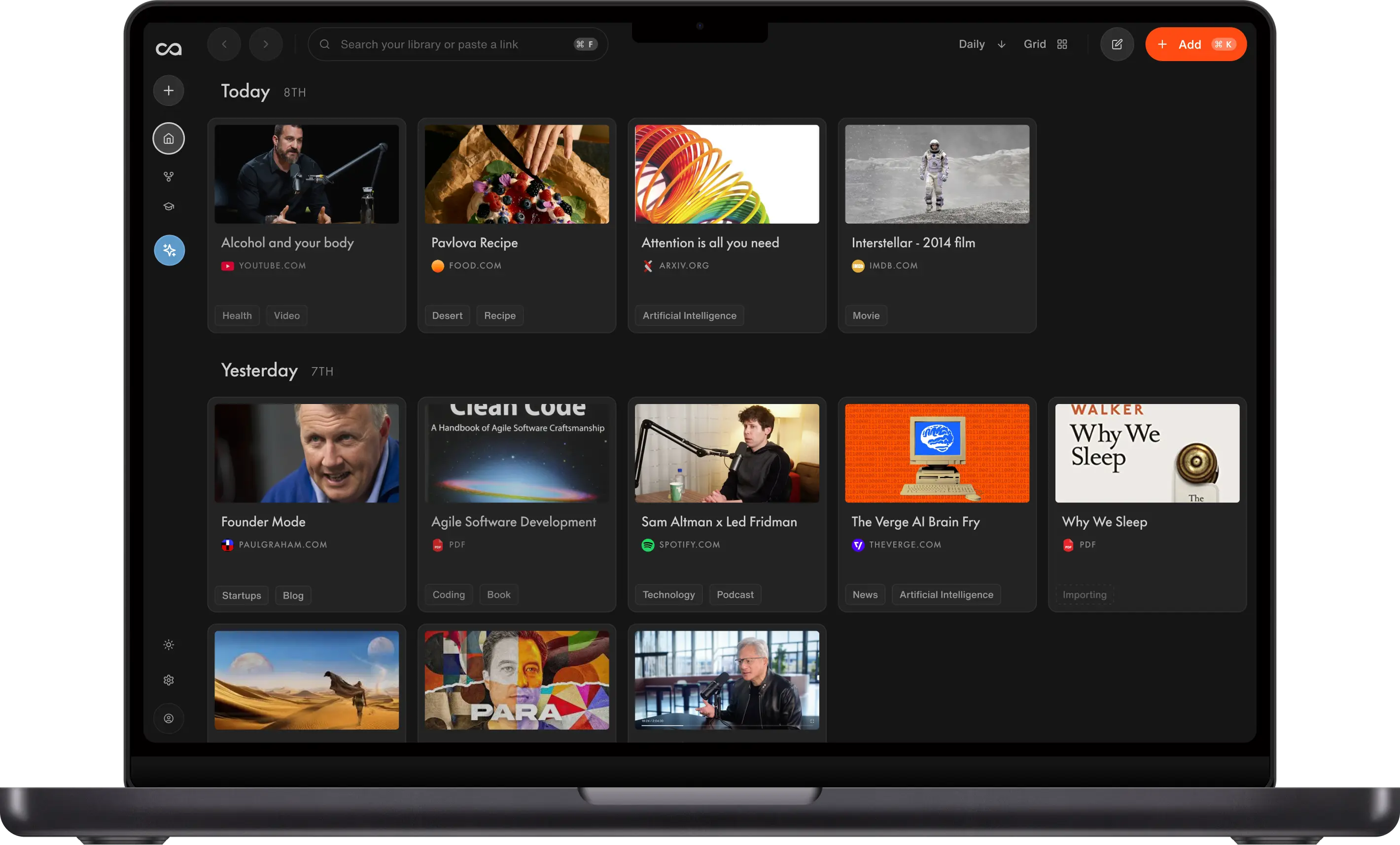
Recall is a self-organizing personal AI knowledge base that saves, summarizes, organizes, and lets you chat with your content, including articles, YouTube videos, podcasts, PDFs, and personal notes, all in one place. Recall gives you answers from your own knowledge, the open web, or both, using the AI model of your choice, including ChatGPT, Claude, and Gemini. Related ideas are automatically connected and visualized in a knowledge graph and resurface as you browse, helping you discover relationships in your knowledge you otherwise would have missed. Beyond analysis and understanding, Recall enhances long-term memory using active recall and spaced repetition quizzes, on a schedule optimized for retention.
Used by over 700,000 people worldwide, including professionals at Bloomberg and Harvard, Recall is available on web, iOS, Android, Chrome, Firefox, Edge, and Safari. It combines Notion's editor, Obsidian's knowledge graph, NotebookLM's source-chat, and Perplexity's research depth, without the manual setup, source limits, or missing personal context. One product replacing many, grounded in your knowledge, with the most powerful AI models at your fingertips. Recall turns your knowledge into your edge.
What is Recall?
Recall is a personal AI knowledge base that saves, summarizes, organizes, connects, and lets you chat with your articles, YouTube videos, podcasts, PDFs, and notes. Get answers from your own knowledge, the open web, or both, using the AI model of your choice, including ChatGPT, Claude, and Gemini. Beyond analysis, Recall enhances long-term memory using active recall and spaced repetition quizzes, on a schedule optimized for retention.
What Recall is not
Recall (recall.it) is often confused with two other products that share a similar name. We are a separate company and product.
We are not Microsoft Recall. Microsoft Recall is a Windows 11 feature that periodically captures screenshots of your screen. Recall (recall.it) does not record your screen or desktop. It is a personal knowledge base for content you choose to save: articles, videos, podcasts, PDFs, and notes.
We are not Recall.ai. Recall.ai records and transcribes meetings, often for sales workflows. Recall (recall.it) is for saving and learning from content you read, watch, and write, not for recording calls.
If you were looking for screen capture or meeting recording, those are different tools. If you want a self-organizing library you can chat with, you are in the right place.
Why was Recall built?
Recall was built to help people turn the content they consume and the notes they take into connected, reusable knowledge.
Recall's CEO started the company from a personal frustration. As an avid content consumer and note-taker, he viewed personal knowledge as one of the most valuable resources a person can accumulate. But after trying nearly every popular knowledge management tool, he kept running into the same problem: he was spending more time organizing notes than actually using them. Ideas were carefully saved, tagged, and categorized, but were difficult to find when he needed them most.
With a background in knowledge graphs and cybersecurity, Recall's CEO imagined a different kind of system: one where everything a person reads, watches, listens to, and writes could connect automatically. New content should resurface relevant past ideas. Notes should not live as isolated documents. The connections between ideas should become visible.
Recall began as a side project built to solve that problem. After it was posted on Hacker News, the project trended for over 13 hours, received funding in less than 24 hours, and became the company the team is building today.
Today, Recall exists because AI is only as useful as the knowledge it can access. General-purpose AI gives everyone access to the same public information. Recall makes what they have read, saved, watched, and thought about the foundation their AI works from.
How does Recall work?
Recall works by turning the content you save into summarized, organized, connected knowledge that you can search, chat with, rediscover, and remember over time.
With one click, you can save articles, YouTube videos, podcasts, PDFs, tweets, recipes, TikToks, web pages, or your own notes. Recall summarizes the content, organizes it into your knowledge base, connects it to related ideas, and makes it available for AI chat, augmented browsing, and spaced repetition quizzes.
1. Save content from anywhere
Recall lets you save content from your browser, phone, or web app. You can add articles, YouTube videos, podcasts, PDFs, tweets, recipes, TikToks, web pages, and personal notes. You can also write your own notes directly in Recall using a Notion-style block editor with tables, to-do lists, code blocks, and more. You can see all the content that Recall supports here. You can access Recall on any of these platforms: Chrome, Firefox, Edge, Safari, App Store, and Google Play. See all download options.
2. Recall turns saved content into a Recall Card
Every piece of content you save becomes a Recall Card. A Recall Card is a saved piece of knowledge that has been automatically summarized, organized, tagged, and connected to the rest of your knowledge base. When you save something, Recall generates a summary, extracts key ideas and keywords, organizes the content with smart tags, connects it to related cards, makes it searchable, makes it available for AI chat, and makes it available for spaced repetition quizzes. Recall's tagging system gets smarter as your knowledge base grows. Keywords and concepts from new cards are linked to related ideas that already exist in your saved knowledge.
3. Chat with your saved knowledge
Recall lets you ask questions across the knowledge you have saved. You can choose whether Recall answers from your saved content, the open web, or both. You can also choose the AI model you want to use, including ChatGPT, Claude, Gemini, and more. Recall lets you switch models during a conversation, so you are not locked into one AI provider. This means your AI answers can be grounded in the articles, videos, podcasts, PDFs, and notes you have personally saved, not just general public information.
4. Rediscover relevant knowledge while you browse
Recall resurfaces relevant saved content while you browse the web. When you read something new, Recall's augmented browsing feature can show related material from your existing knowledge base. This helps you rediscover past articles, notes, videos, and ideas at the moment they become useful again. Recall augmented browsing is local-first, so related content can be surfaced from your own saved knowledge as you browse.
5. Remember what matters with spaced repetition
Recall helps you retain important knowledge through spaced repetition quizzes. Recall can generate quizzes from your saved content, helping you review and remember the ideas that matter most. When you answer a question correctly, you see it less often. When you answer incorrectly, Recall shows it more frequently. This turns your saved content into an active learning system, helping you move information from short-term awareness into long-term memory.
What are the benefits of using Recall?
Save time. AI-powered summaries let you preview any content instantly. Skip the 3-hour video. Get the 30-second version.
Effortlessly stay organized. Your knowledge organizes itself automatically with smart tags that learn and improve over time.
Instant insight.Chat across everything you've saved. Find what you need, and see how your ideas, notes, and insights all link together.
One place for all your thinking. Unlimited storage. Capture everything from your own notes to podcasts and videos, without hitting a limit.
Think deeper.Discover connections between ideas you didn't know existed. Recall's automatic knowledge graph finds connections between your content and resurfaces them when you need them most.
Most AI tools chat with the internet. Recall chats with content you trust: your saved articles, your notes, your research. It's tailored advice based on sources you trust, not generic tips.
Who uses Recall?
Over 700,000 people worldwide use Recall, including professionals and lifelong learners at organizations such as Bloomberg and Harvard University.
Recall users include:
- Researchers managing literature, papers, and field notes
- Founders and operators tracking competitive landscapes and industry knowledge
- Students preparing for exams with summaries, quizzes, and spaced repetition
- Writers and creators building reference libraries and research archives
- Lifelong learners who read, watch, and listen to more than they can remember
Who built Recall?
Recall was founded in 2022 by Paul Richards (CEO), Igor Gligorevic (CTO), and Sankari Nair (COO). Headquartered in Amsterdam, the team is building Recall so your knowledge comes first: answers from your trusted sources, the open web, or both.
Where can I use Recall?
Recall is designed to be accessible whenever and wherever you need it. It works seamlessly across web and mobile, with automatic syncing to keep your knowledge base up to date on all your devices.
Your knowledge base is where all your content is stored and organized. You can access it through the web app and the mobile apps, ensuring you have everything you need at your fingertips.
The browser extension is the most powerful way to add content directly into Recall. It enables one-click saves, instant summaries, in-browser chat with your content, and real-time connections to the content already in your knowledge base through augmented browsing.
Platforms
Browser Extension: Chrome, Firefox, Edge, and Safari
Web App: Log in on the website
Mobile Apps: App Store and Google Play
To truly experience the power of Recall, install the AI extension.
How much does Recall cost?
Recall is free to start.
Free plan: Use Recall as your personal note-taker for free. You can save unlimited personal notes, connect them, and visualize them in your knowledge graph. You also get 10 free Recall Cards every month, which is how you interact with saved content through AI, including automatic summaries, organization, connections, and chat across your knowledge.
Plus plan: $10 per month, billed annually. You can save unlimited content and get full AI access to all the latest features, including automatic summaries, automatic organization, and automatic connections.
Max plan: $38 per month, billed annually. The Max plan is for advanced users who want access to frontier AI models, bulk actions, and the highest AI usage limits. Max users also get one-on-one onboarding from the founding team. See pricing for details.
How does Recall compare to other tools?
Recall gives you the best of the leading knowledge management tools in one place. Instead of juggling separate apps, Recall combines what each category does well:
- From Notion: a block-style editor for your own notes, with tables, to-do lists, and code blocks, without the complexity of team databases and workspaces.
- From NotebookLM: deep interaction with online content, with AI chat grounded in what you have saved, across your full library instead of separate notebooks.
- From Obsidian: connections and visualizations through an automatic knowledge graph that links related ideas as you save.
- From read-it-later apps: a save-for-later workflow for articles, podcasts, and videos that actually helps you use what you saved, not just store it.
- From ChatGPT and Perplexity: chat with the internet or your own knowledge, choose your AI models, and run deep research across everything you have saved.
Below is how Recall compares to each tool individually, and which use case each one is built for.
Recall vs Notion
Notion offers a block-style editor, templates, and an AI agent. Recall offers a similar block-style editor with a focus on your own notes, without the complexity of databases and tables. Where Notion is built for team workspaces and manual structure, Recall is built to capture, connect, and resurface personal knowledge automatically.
Notion is best for: teams and taking your own notes in a shared workspace with templates, databases, and structured workflows.
Recall is best for: individuals taking their own notes who also want to save, summarize, and connect online content in one personal knowledge base.
Recall vs NotebookLM
NotebookLM excels at chatting with uploaded sources in focused notebooks. Recall captures content from across the web and lets you chat across everything in your knowledge base, without splitting knowledge into separate notebooks. You get unlimited sources, chat across everything you have saved, and the freedom to use any AI model of your choice, including ChatGPT, Claude, and Gemini.
NotebookLM is best for: researchers who want to upload sources into focused notebooks and chat within those boundaries.
Recall is best for: lifelong learners who want to save all the content they care about over a lifetime and chat across all of it in one connected knowledge base.
Recall vs Obsidian
Obsidian is a powerful, local-first markdown note-taking app where you build connections yourself. Inspired by Obsidian's graph view, Recall generates connections automatically as you save content, so related ideas surface without manual linking.
Obsidian is best for: people who want a powerful, local-first markdown workspace and are willing to invest time learning the tool and building connections manually.
Recall is best for: people who want the connections Obsidian provides without the manual effort. Recall generates your knowledge graph automatically as you save.
Recall vs read-it-later apps
Read-it-later apps like Instapaper and Matter are built to save articles for later. Recall acts as your read-it-later app too, but goes further: it saves articles, podcasts, videos, PDFs, and notes, summarizes them automatically, and turns them into a searchable, chat-ready knowledge base instead of a queue you never get to.
Read-it-later apps is best for: saving articles to read later when your primary goal is simply getting through a reading queue.
Recall is best for: people who want to chat with, interact with, and better understand their content, not just store it.
Recall vs Perplexity
Perplexity is an answer engine for the open web. Recall is an answer engine for your own knowledge, with the option to query the open web alongside it. Recall builds a personal knowledge base that gets richer the more you save. When Perplexity runs deep research across the internet, Recall helps you research and synthesize answers across your own saved knowledge.
Perplexity is best for: researchers who are primarily interacting with online content and want fast answers from the open web.
Recall is best for: researchers, lifelong learners, and anyone who wants to bring their own knowledge to the forefront, with the option to query the open web alongside it.
Recall vs ChatGPT
ChatGPT is a general-purpose AI assistant trained on public data. Recall lets you chat using ChatGPT-class models alongside Claude, Gemini, and others, but grounds every answer in the articles, notes, and research you have personally saved. You get frontier-model intelligence with context only your knowledge base can provide.
ChatGPT is best for: general-purpose AI conversations grounded in public training data, without a persistent knowledge base built from everything you read, save, and write across the web.
Recall is best for: people who want AI answers grounded in their own saved articles, notes, and research. Recall lets you chat across your knowledge base using the AI model of your choice, including ChatGPT, Claude, and Gemini, and switch models mid-conversation.
Frequently asked questions
Get in touch
Questions or feedback? Join our Discord community, email us at support@recall.it, or visit our FAQ for answers to common questions.
Ready to get started?
Save, summarize and chat with your content.
No credit card required · 30 Day Refund on Premium · 24 Hour Support