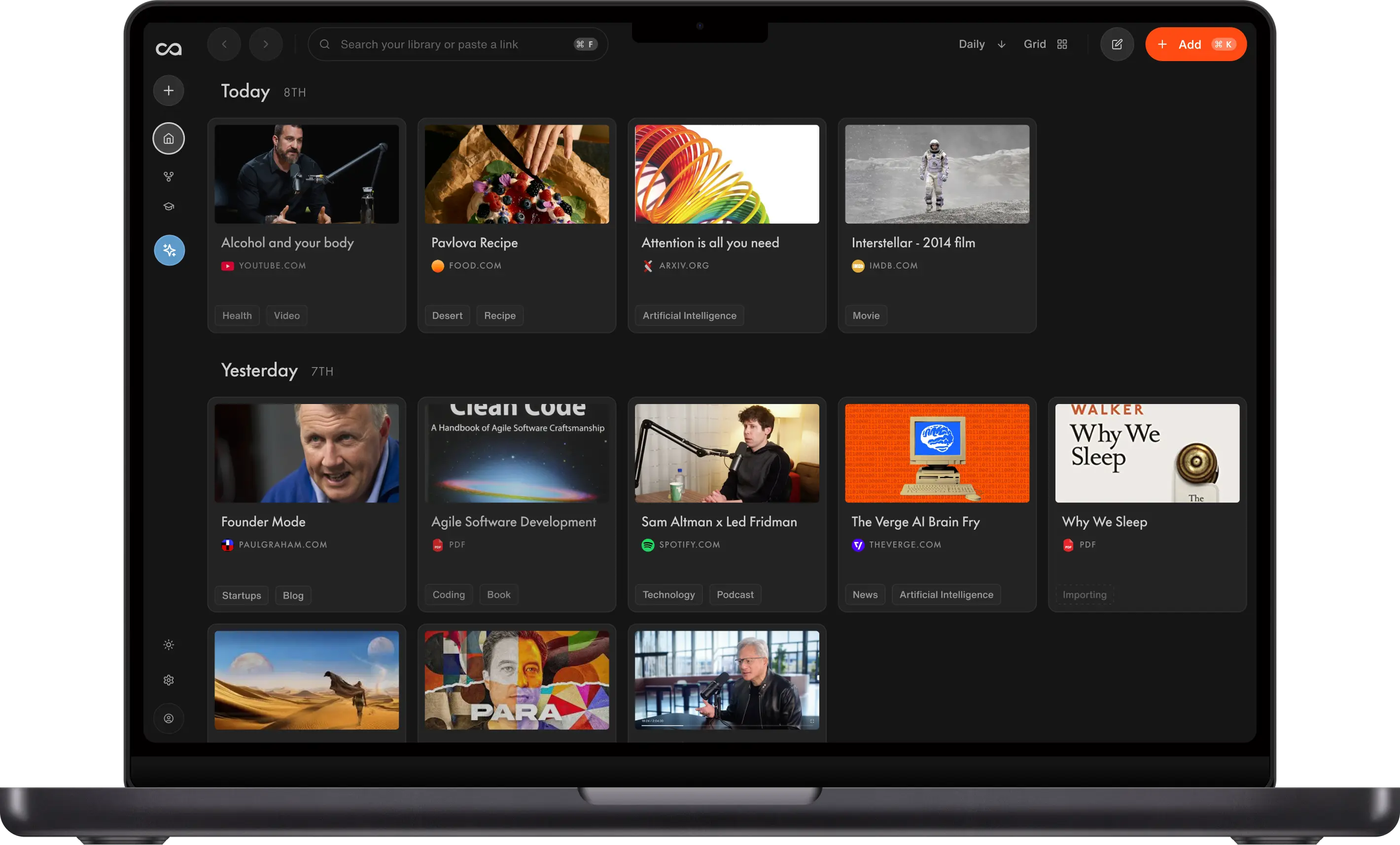
Best Second Brain Apps in 2026: 16 Ranked by Use Case
Most second brains take knowledge in and never bring it back out. We ranked 16 by capture, how knowledge compounds, and whether you can chat with what you saved: Recall for a personal AI knowledge base that resurfaces what you save, Obsidian for a local vault, Mem for fast AI notes, and Notion for templates and workspaces.
Best second brain apps in 2026: Recall, Obsidian, Mem, Tana, NotebookLM, Notion, Capacities, Heptabase, Logseq, Anytype, Reflect, Roam Research, DEVONthink, RemNote, Evernote, and OneNote compared
Last updated: June 2026
What is the best second brain app?
Choose Recall when you want a second brain that turns saved knowledge into lasting value instead of another archive you never revisit. Capture anything, get automatic summaries, let it self-organize, and chat with your full archive so your own saved sources are cited before generic answers, meaning an article, video, podcast, or PDF you saved years ago can reappear as context when it is relevant to a question today. That is the core value of a second brain: your past learning becomes context for future questions. Below, we walk through 16 second brain apps we have tried and tested, and the criteria that separate them, from where your knowledge lives and how much you own, to how it resurfaces and compounds, how well AI chat works across it, and how easily it flows into your other tools.
What is a second brain, and why does it matter?
A second brain matters more than ever in the age of AI chatbots. ChatGPT alone has around 900 million weekly active users and processes roughly 2.5 billion prompts a day, and about half of U.S. adults now use AI chatbots, with roughly one in four using them daily. The instinct is to ask the internet instead of ourselves, so a generic model answers from the open web while your own articles, notes, and ideas sit in a pile you never revisit. A second brain flips that order: it makes your own knowledge the first place answers come from. That is exactly what Recall is built for, letting you chat with your own library and get answers grounded in what you have already learned, with your saved sources cited first.
A second brain is an external system that stores everything you learn so you do not have to keep it in your head. The term was popularized by Tiago Forte in Building a Second Brain, built on a loop he calls CODE:
- Capture: Save the ideas, notes, and content that resonate with you.
- Organize: Store saves so they are easy to act on later (Forte's PARA system: Projects, Areas, Resources, Archives).
- Distill: Summarize the essence of each note.
- Express: Use what you saved to create, decide, and share.
An AI-powered second brain automates the heavy parts of that loop: a tool like Recall summarizes on save, organizes automatically, links related ideas in a knowledge graph, and lets you chat across everything you have stored.
But a second brain only earns its name if you actually revisit and reuse what you save. Most setups break down on a few predictable points:
- Capture friction: Saving from the web, YouTube, podcasts, and PDFs takes too many steps
- No retrieval: Notes pile up but you can never find or reuse them later
- Manual organizing: Folders and tags need constant upkeep to stay useful
- No workflow integration: Your knowledge is trapped in one app instead of available to the tools where you write, research, code, or make decisions
- No compounding value: Nothing resurfaces or connects, so saved knowledge fades instead of improving future work
- No API, MCP, or integration layer: The best second brain tools increasingly need an API, MCP, or integration layer, because knowledge only becomes truly useful when it can flow into the AI assistants and workflows where you already work
What to use when
- Recall if you want a true second brain: one growing library for YouTube videos, podcasts, PDFs, articles, and notes, with chat across your full archive that cites your own saved sources first, automatic organization, and spaced repetition so knowledge compounds for years.
- Obsidian + Claude if you are technical, want local Markdown files you own, and will maintain your own AI workflow on top.
- Mem if you want fast AI-native notes tied to your calendar and week more than a long-term learning archive.
- Tana if you are a power user who wants supertags, structured nodes, and an AI-native outliner.
- NotebookLM if your work stays inside one bounded research notebook within Google's ecosystem.
- Notion if you want a flexible, structured workspace for docs, databases, and wikis, and you are comfortable building the system yourself.
- Capacities if you think in objects like people, books, meetings, and topics instead of folders.
- Heptabase if you learn by mapping notes visually on a whiteboard.
- Logseq if you want a free, open-source, local-first outliner with graph and flashcard workflows.
- Anytype if privacy-first, object-based organization matters more than integrations.
- Reflect if you want networked daily notes with backlinks and a built-in AI assistant for a lightweight personal setup.
- Roam Research if you want the classic academic networked-thought workflow built around daily notes and block references.
- DEVONthink if your second brain is a serious local document archive on Mac, with PDFs, webpages, scans, research files, OCR, smart groups, and powerful search.
- RemNote if you are a student who wants notes and spaced repetition in the same system.
- Evernote AI if you want a familiar legacy capture app with web clipping, notebooks, search, and newer AI features.
- OneNote + Copilot if your notes, meetings, and work already live inside Microsoft 365.
Best second brain apps compared (2026): ranked by the kind of knowledge they manage, how they turn saved information into compounding value, and whether they support local-first ownership, AI chat, workflow integration, exportability, APIs, and MCP.
Get started with Recall for free
See why Recall is the best second brain app: save what you learn, get AI summaries, and chat across a knowledge base that compounds.
| App | Best for | Knowledge type | Local-first / ownership | How knowledge compounds | AI chat across knowledge | Workflow integration | Export / API / MCP | Main tradeoff |
|---|---|---|---|---|---|---|---|---|
| Recall | Lifelong learning from the web | Web, video, PDFs, podcasts, and notes | ✗ cloud app | Your saved sources are cited first in chat, so years-old content becomes relevant context again | ✓ | ✓ AI assistants and knowledge workflows | ✓ API + MCP | Not local-first |
| Obsidian + AI | Local-first DIY control | Markdown notes and files | ✓ | Backlinks, graph, search, Canvas, plugins | ~ via plugins | ✓ plugins and local files | ✓ Markdown files, plugins, MCP | Requires setup and maintenance |
| Mem | AI-native notes | Notes, meetings, and brain dumps | ✗ | AI search, automatic organization, related notes, chat | ✓ | ~ meetings, capture, browser extension | ~ export/integrations | Less control over structure |
| Tana | Supertags and structured graph | Nodes, fields, meetings, projects | ✗ | Supertags, live queries, graph views, AI commands | ~ | ~ commands and structured workflows | ~ API/exports | Steep learning curve |
| NotebookLM | Bounded research projects | Uploaded source sets | ✗ | Citation-backed Q&A, summaries, mind maps, audio overviews | ✓ within notebook | ~ Google ecosystem | ✗ limited export/API | Scope resets per notebook |
| Notion AI | Structured docs and databases | Pages, docs, databases, wikis | ✗ | Search, database views, relations, Notion AI | ~ | ✓ docs, teams, automations | ✓ API, exports, integrations | Manual structure and workspace sprawl |
| Capacities | Object-based PKM | People, books, meetings, projects, topics | ✗ | Object links, graph, daily notes, AI assistant | ~ | ~ calendar and capture workflows | ~ export/API limits | No local file ownership |
| Heptabase | Visual research | Cards, PDFs, whiteboards | ~ offline support | Spatial maps, card clusters, PDF links, AI summaries | ~ | ~ research workflow | ~ limited export/API | Visual structure is hard to export |
| Logseq | Open-source local-first outlining | Outlines, journals, blocks, PDFs | ✓ | Backlinks, graph, queries, whiteboards, flashcards | ~ via plugins | ✓ plugins and local files | ✓ Markdown/Org files, plugins | Outliner workflow is polarizing |
| Anytype | Privacy-first objects | Objects, sets, notes, dashboards | ✓ | Object links, sets, graph, widgets | ~ | ~ local/private workflows | ~ export/API maturing | Younger ecosystem |
| Reflect | Minimal daily notes | Daily notes, backlinks, highlights | ~ E2E encrypted | Backlinks, daily notes, graph, AI summaries | ~ | ~ calendar and capture | ~ export/integrations | Narrow feature set |
| Roam Research | Classic networked thought | Daily notes, blocks, linked pages | ✗ | Daily notes, block references, backlinks, graph | ✗ | ~ networked note workflow | ~ exports/API | Less modern AI and high price |
| DEVONthink | Local document archive | PDFs, webpages, scans, files | ✓ | Search, smart groups, OCR, classification, related documents | ✗ | ✓ Apple document workflows | ✓ local files, scripting/automation | Mac/iOS only and less AI-native |
| RemNote | Students and study review | Notes, flashcards, course material | ✗ | Flashcards, spaced repetition, backlinks, AI study tools | ~ | ~ study workflows | ~ exports | Study-first, less general-purpose |
| Evernote AI | Legacy capture and search | Notes, notebooks, clips, files | ✗ | Web clipping, notebooks, search, AI edit/search | ~ | ~ capture and legacy integrations | ~ exports/integrations | Weaker networked thought |
| OneNote + Copilot | Microsoft ecosystem notes | Notebooks, meetings, Office files | ✗ | Notebook hierarchy, Outlook/Teams context, Copilot | ~ | ✓ Microsoft 365 | ✓ Microsoft Graph/ecosystem | Limited graph and compounding value |
Legend: ✓ strong fit · ✗ gap · ~ partial. Scroll horizontally on small screens.
How to build a second brain
How to build a second brain in practice, whether you do it manually or let AI handle most of it:
- Pick one home for everything. A second brain fails when knowledge is scattered across notes apps, bookmarks, and screenshots. Choose a single second brain app and route everything into it.
- Make capture effortless. Use a browser extension and mobile share sheet so saving an article, video, or PDF takes one click. If capture has friction, you will stop doing it.
- Let summaries do the distilling. Forte's "distill" step is the slowest by hand. AI summaries on save give you the gist of each item without rereading or rewatching.
- Organize automatically. Manual folders rot. Prefer tags, categories, and a knowledge graph that build themselves as you save, so retrieval works months later.
- Make it conversational. The payoff of a second brain is recall. Chat across your whole library so you can ask questions and get answers grounded in what you saved.
- Review what matters. Add spaced repetition so important ideas resurface on a schedule instead of fading.
- Express and reuse. Pull saved knowledge into notes, drafts, and decisions. A second brain earns its name only when you use it to create.
How to develop a second brain over time: start small with one source type you already consume (for example YouTube or articles), build the daily capture habit first, and let the system grow. The goal is compounding knowledge, not a perfect folder structure on day one.
How to choose a second brain app
Match the tool to how you actually learn and work:
- Knowledge type: Recall is strongest for web, video, podcasts, PDFs, and notes. Obsidian and Logseq fit Markdown-style notes. DEVONthink fits local document archives. NotebookLM fits bounded source sets. Notion, Tana, and Capacities fit structured workspaces.
- Compounding value: Storage is not enough. Look for chat across your library, semantic search, spaced repetition, graph views, backlinks, visual canvases, related-document discovery, or workflows that make old ideas useful again.
- Capture surface: Do you save mostly from the web, video, podcasts, and PDFs (Recall), archive local documents and scans (DEVONthink), or mostly type your own notes (Obsidian, Notion, Tana, Reflect)?
- Automation vs. structure: Recall and Mem auto-organize as you save. Notion, Obsidian, Tana, Logseq, and Anytype expect you to shape the system.
- AI depth: Look for automatic summaries, library-wide chat, and multi-model AI, not just an AI writing helper inside the editor.
- Workflow integration: Your second brain should fit the places where you already write, research, code, meet, and make decisions. Browser extensions, calendar hooks, document workflows, and workspace integrations decide whether knowledge actually gets used.
- Exportability, APIs, and MCP: Your second brain should not trap knowledge in a silo. Exports protect you from lock-in, APIs let other apps work with your knowledge, and MCP lets AI assistants use your saved context directly inside current workflows.
- Retrieval: Semantic search and chat across everything beat folder-diving when your library grows past a few hundred items.
- Retention: Spaced repetition turns a storage tool into a learning tool. Recall, Logseq, and RemNote are strongest here.
- Ownership: Obsidian, Logseq, and Anytype are strongest when local-first data ownership matters.
- Scope: NotebookLM is built for one bounded project notebook, not a lifelong library that spans topics and years.
16 best second brain apps in detail
1. Recall
Recall is best for: lifelong learners who want one second brain for everything they save from the web plus their own notes, with automatic summaries, automatic organization, library-wide chat, and multiple AI models. Its biggest advantage is that chat makes your saved knowledge useful again: content from years ago can come back as cited context when it answers a question today.
Recall AI second brain knowledge base in 2026: save web content, summaries, notes, and chat across your full learning library
Recall features:
- Browser and mobile capture: Save from the open web with the Chrome extension, Firefox extension, iOS app, or Android app.
- AI summaries on save: Automatic summaries when you save supported content types.
- Library-wide chat with your sources first: Ask questions across your full archive, not one note or notebook. Recall can surface and cite saved content from years ago when it is relevant to a current question (chat docs).
- Multiple AI models: Use frontier models beyond a single vendor stack.
- Automatic organization: Categories, tags, and a knowledge graph generated as you save.
- Rich notes: Tables, tasks, and code in Recall notes.
- Spaced repetition: Built-in quizzes and review for long-term retention.
- Listen mode: Audio playback of your summaries for review on the go.
Recall pricing: Start on the free tier (unlimited saves; limited AI summaries on save). Recall Plus (from about $10/mo on annual billing) is what most learners need: full AI summaries, library-wide chat, multiple models, organization, rich notes, and listen mode. Recall Max is for heavier AI usage. See Recall pricing for current plans.
Knowledge type: Recall stores articles, YouTube videos, podcasts, PDFs, webpages, and your own notes in one AI knowledge base.
How knowledge compounds: Recall combines semantic search, a knowledge graph, library-wide chat, quizzes, spaced repetition, listen mode, and API/MCP access. The important part is that chat makes your own library the first place answers come from: old saves become cited evidence for new questions, so the library gets more valuable every year.
Recall as a second brain: Recall automates Forte's capture, organize, and distill steps end to end, then adds retrieval and retention that most note apps lack. Tradeoff: it is not local-first, so choose Obsidian or Logseq if file ownership is your top priority.
2. Obsidian + AI
Obsidian + AI is best for: technical learners, writers, and researchers who want maximum control: a local-first Markdown vault they own, plus an AI layer through plugins, Claude, or a custom retrieval setup.
Obsidian in 2026: local-first Markdown second brain with graph view, plugins, and a DIY AI workflow
Obsidian features:
- Local Markdown vault: Files stay on your device; you own the data.
- Backlinks and graph view: See connections between notes as a knowledge graph.
- Canvas: Map ideas visually inside the vault.
- Plugins: A large community ecosystem for tasks, Dataview, Zotero, AI, templates, highlights, and publishing.
- AI layer: Use community AI plugins, Claude, or the Karpathy LLM wiki pattern.
Obsidian pricing: Free for personal use. Sync and Publish are optional paid add-ons; AI tools may require separate subscriptions.
Knowledge type: Obsidian is built around local Markdown notes, files, links, canvases, and plugin-generated views.
How knowledge compounds: Backlinks, graph view, search, Canvas, Dataview queries, citation/highlight integrations, AI plugins, and MCP-style vault access can make old notes useful in future workflows. Tradeoff: the compounding power depends on how well you maintain the vault and plugins.
Obsidian vs Recall: Obsidian is the best second brain for local-first ownership and DIY control. Recall gives you automatic capture, summaries, organization, chat, and spaced repetition without building the system yourself.
Related: Build Karpathy's LLM wiki in Recall (no code)
3. Mem
Mem is best for: fast AI-native notes tied to how you run your week, especially when calendar, meeting, and brain-dump capture matter more than a curated long-term learning archive.
Mem in 2026: AI-native second brain for fast notes, automatic organization, meetings, and chat with your notes
Mem features:
- AI-native notes: Write, dictate, or clip, then let AI organize behind the scenes.
- Smart search and chat: Ask questions over your note history.
- Related notes: Surface connected context while you write.
- Meeting capture: Record, transcribe, and summarize meetings.
- Low-friction inbox: Built for dumping ideas without folder work.
Mem pricing: Free tier with limits; paid plans commonly around $10 to $15/mo (verify on mem.ai).
Knowledge type: Mem is built around notes, meetings, quick captures, voice input, and brain dumps.
How knowledge compounds: AI search, chat, related notes, and automatic organization help your notes become context later. Tradeoff: because AI does much of the organizing, you get less visible control than in Obsidian, Tana, or Notion.
Mem vs Recall: Mem is stronger for self-authored notes, meetings, and fast work capture. Recall is stronger when your second brain is mostly things you read, watch, and save from the web.
4. Tana
Tana is best for: power users who want a structured, AI-native outliner with supertags and flexible nodes to model their own second brain.
Tana in 2026: AI-native second brain with supertags, structured nodes, and outlining for power users
Tana features:
- Supertags: Turn any node into structured data with fields and views.
- Outliner-first editor: Everything is a node you can nest, reference, and query.
- AI command nodes: Generate, summarize, and structure content using your own schemas.
- Live search nodes: Build dashboards that update as your graph changes.
- Meeting and voice capture: Quick capture that flows into your structure.
Tana pricing: Free tier available; paid plans from about $10/mo (verify on tana.inc).
Knowledge type: Tana is built around nodes, fields, meetings, projects, people, tasks, and custom supertags.
How knowledge compounds: Supertags, live queries, field-based search, graph views, AI commands, and structured workflows can turn captured notes into a living operational graph. Tradeoff: the system is powerful because you design it, which also means the learning curve is real.
Tana vs Recall: Tana is better if you want to design a custom structured knowledge graph, and its voice notes are a standout: capture a spoken thought on the go and Tana transcribes it and routes it into the right place in your structure. Recall is better if you want capture, summaries, organization, chat, and review to happen automatically across everything you save from the web.
5. NotebookLM
NotebookLM is best for: bounded research projects where you want grounded AI answers over a defined source set inside Google's ecosystem.
NotebookLM in 2026: project-scoped AI research notebook for bounded sources inside Google's ecosystem
NotebookLM features:
- Source upload: PDFs, Google Docs, pasted text, websites, and YouTube (with captions).
- Grounded chat: Answers tied to your uploaded sources, with citations.
- Studio outputs: Study guides, briefings, timelines, and mind maps.
- Audio Overviews: Podcast-style summaries of your source set.
- Gemini: Google's models power Q&A and generation.
NotebookLM pricing: Free on the Standard tier with a Google account; higher caps on Google AI plans.
Knowledge type: NotebookLM is built around uploaded source sets: PDFs, Google Docs, websites, pasted text, and YouTube videos with captions.
How knowledge compounds: Chat, citations, study guides, timelines, mind maps, and audio overviews make a bounded source set more useful. Tradeoff: it is project-scoped, not a lifelong second brain across every topic.
NotebookLM vs Recall: NotebookLM is excellent for one bounded notebook. Recall is better when knowledge must compound across projects and years. For a full breakdown, see the best NotebookLM alternatives guide.
6. Notion AI
Notion is best for: people who want a flexible, structured workspace to build a second brain by hand, with docs, databases, wikis, and team collaboration.
Notion AI in 2026: flexible second brain workspace for docs, databases, wikis, and structured knowledge
Notion features:
- Block-style docs: Flexible pages for notes, wikis, and project hubs.
- Databases: Tables, boards, calendars, and galleries to structure knowledge.
- Relations and rollups: Build linked systems for projects, areas, resources, and archives.
- Notion AI: Draft, summarize, search, and ask questions inside your workspace.
- Team workspaces: Shared spaces with permissions and comments.
Notion pricing: Free for personal use with limits; Plus about $10/mo per user on annual billing; Notion AI may require paid access depending on plan (verify on notion.so).
Knowledge type: Notion is built around pages, docs, databases, wikis, templates, relations, and dashboards.
How knowledge compounds: Database views, relations, search, templates, dashboards, Notion AI, API access, and integrations can make structured knowledge useful across projects. Tradeoff: without maintenance, Notion workspaces sprawl.
Notion vs Recall: Notion is the flexible second brain canvas, and its huge library of templates is a real advantage: you can drop in a ready-made system for notes, projects, wikis, or PARA instead of building one from scratch. Recall is the better automatic AI second brain for content you capture from the web and want turned into summaries, chat context, and review.
7. Capacities
Capacities is best for: people who think in objects instead of folders: people, books, meetings, projects, topics, places, quotes, and ideas.
Capacities in 2026: object-based second brain for connected people, books, meetings, projects, and topics
Capacities features:
- Object types: Every note can have a type with fields and relationships.
- Daily notes: A natural inbox for quick capture.
- Graph and links: Connect objects into a living knowledge network.
- AI assistant: Summarize, draft, and ask questions with knowledge context.
- Calendar and mobile capture: Keep objects tied to time and context.
Capacities pricing: Free tier available; paid plans commonly around $10/mo (verify on capacities.io).
Knowledge type: Capacities is built around typed objects: people, books, meetings, projects, topics, places, quotes, and notes.
How knowledge compounds: Object links, backlinks, graph views, daily notes, and AI assistance make knowledge easier to reuse by type and relationship. Tradeoff: it is not local-first and has a smaller ecosystem than Obsidian or Notion.
Capacities vs Recall: Capacities is better if you want to model your world as objects. Recall is better if your second brain starts with web content and you want automatic summaries, organization, chat, and review.
8. Heptabase
Heptabase is best for: visual thinkers, students, and researchers who need to arrange ideas spatially on whiteboards instead of keeping everything in folders or outlines.
Heptabase in 2026: visual second brain for researchers using cards, PDFs, and whiteboards to map complex ideas
Heptabase features:
- Infinite whiteboards: Arrange note cards visually and cluster ideas by topic.
- Cards as notes: Each card is a real note you can write inside.
- PDF highlighting: Pull evidence from source documents into your thinking space.
- AI summaries and Q&A: Use AI to summarize cards and explore research.
- Offline-capable desktop workflow: Useful for focused research sessions.
Heptabase pricing: Paid plans commonly start around $10 to $12/mo; free trial available (verify on heptabase.com).
Knowledge type: Heptabase is built around cards, PDFs, highlights, and whiteboards.
How knowledge compounds: The canvas itself is the value layer: clusters, spatial relationships, PDF-linked highlights, and card groups make connections visible. Tradeoff: visual structure can be hard to export or migrate.
Heptabase vs Recall: Heptabase is better for mapping complex research visually. Recall is better for automatic capture, summaries, chat, and review across a broad lifelong learning library.
9. Logseq
Logseq is best for: open-source advocates, students, and researchers who want a local-first outliner with backlinks, graph view, queries, and flashcards.
Logseq in 2026: open-source local-first second brain with daily journals, backlinks, graph view, and flashcards
Logseq features:
- Local-first files: Store notes as Markdown or Org-mode.
- Outliner workflow: Everything is a nested block you can reference.
- Daily journals: Capture first, structure later.
- Graph and backlinks: Link pages and blocks across your knowledge base.
- Flashcards: Built-in review workflows for learning.
- PDF annotation: Link notes to specific source passages.
Logseq pricing: Free and open source; optional sync may be paid.
Knowledge type: Logseq is built around outlines, daily journals, blocks, PDFs, flashcards, and local Markdown or Org files.
How knowledge compounds: Backlinks, graph view, queries, whiteboards, daily journals, flashcards, local files, and plugins help old notes become useful again. Tradeoff: the outliner model is polarizing and can slow down on large graphs.
Logseq vs Recall: Logseq is better if you want an open-source local-first outliner with review workflows. Recall is better if you want automatic summaries, library-wide chat, and capture across web/video/PDF content without maintaining a vault.
10. Anytype
Anytype is best for: privacy-conscious users who want an object-based workspace with local-first data and encrypted peer-to-peer sync.
Anytype in 2026: privacy-first object-based second brain with local-first storage, encrypted sync, sets, and graph view
Anytype features:
- Object-based structure: Notes, people, projects, books, and tasks can all have types and relations.
- Local-first storage: Designed around ownership and offline access.
- End-to-end encryption: Privacy-first sync across devices.
- Sets and widgets: Build database-like views and dashboards.
- Graph view: See connected objects visually.
Anytype pricing: Free tier available; paid plans for extra storage and collaboration (verify on anytype.io).
Knowledge type: Anytype is built around objects, sets, notes, dashboards, tasks, and encrypted local-first spaces.
How knowledge compounds: Object links, sets, widgets, backlinks, graph views, and local-first ownership make knowledge retrievable by relationship and type. Tradeoff: the ecosystem is younger and less mature than Notion or Obsidian.
Anytype vs Recall: Anytype is better if privacy-first local ownership is central. Recall is better if you want automatic AI capture, summarization, chat, and review across content you consume.
11. Reflect
Reflect is best for: people who want a lightweight, networked second brain built around daily notes, backlinks, and an AI assistant.
Reflect in 2026: AI note-taking second brain app with daily notes, backlinks, graph view, and AI assistant
Reflect features:
- Daily notes: A frictionless place to think and capture each day.
- Backlinks and graph: Networked notes that connect as you link.
- AI assistant: Built-in AI for writing, summarizing, and asking questions.
- Browser extension and clipper: Save highlights and articles into your notes.
- End-to-end encryption: Privacy-focused storage and sync.
Reflect pricing: From about $10/mo (verify on reflect.app); no free-forever tier comparable to others on this list.
Knowledge type: Reflect is built around daily notes, backlinks, highlights, calendar-linked notes, and personal writing.
How knowledge compounds: Daily notes, backlinks, graph view, calendar context, highlight imports, and AI summaries make Reflect strong for personal reflection and light knowledge work. Tradeoff: it is deliberately narrower than Notion, Obsidian, or Tana.
Reflect vs Recall: Reflect is a clean, fast second brain for daily notes and networked thinking. Recall is better for a content-rich AI knowledge base with summaries, chat, and retention.
12. Roam Research
Roam Research is best for: academics, writers, and networked-thought purists who want daily notes, block references, and bidirectional linking in the classic Roam style.
Roam Research in 2026: classic networked thought second brain with daily notes, block references, backlinks, and graph view
Roam Research features:
- Daily notes: Start each day from an inbox and link as you think.
- Block references: Reuse and cite individual bullets across pages.
- Bidirectional links: Build a graph through regular writing.
- Graph view: Explore note connections visually.
- Outliner workflow: Capture granular thoughts quickly.
Roam Research pricing: Paid subscription with a trial; verify current pricing on roamresearch.com.
Knowledge type: Roam is built around daily notes, blocks, bidirectional links, and graph-based networked thought.
How knowledge compounds: Backlinks, linked references, daily notes, and graph views make old thoughts reappear through the act of linking. Tradeoff: Roam is less AI-native and less local-first than newer alternatives.
Roam vs Recall: Roam is best when you want the original networked-thought workflow. Recall is better for AI-assisted capture and retrieval across saved content.
13. DEVONthink
DEVONthink is best for: Mac users whose second brain is a serious local document archive: PDFs, webpages, scans, research files, notes, emails, and reference material that needs to stay searchable for years.
DEVONthink in 2026: local-first document second brain for Mac users with PDFs, scans, OCR, smart groups, and related-document search
DEVONthink features:
- Local databases: Store large personal archives on your Mac.
- Document capture: Save PDFs, webpages, notes, scans, emails, images, and office files.
- OCR and search: Make scanned documents searchable.
- Smart groups and classification: Organize and retrieve files by rules, metadata, and similarity.
- Related documents: Surface similar files and forgotten references from your archive.
DEVONthink pricing: Paid Mac app with multiple editions; verify current pricing on devontechnologies.com.
Knowledge type: DEVONthink is built around PDFs, webpages, scans, emails, notes, and large local document databases.
How knowledge compounds: Search, OCR, smart groups, classification, metadata, and related-document discovery make old documents useful again in a large local archive. Tradeoff: it is less AI-native than Recall, Mem, Tana, or NotebookLM, and it is primarily for Mac/iOS users.
DEVONthink vs Recall: DEVONthink is better if you want a local-first document brain for serious archives on Mac. Recall is better if you want an AI second brain that summarizes, organizes, chats with, and reviews the web content you save.
14. RemNote
RemNote is best for: students who want notes and spaced repetition flashcards in one study-focused second brain.
RemNote in 2026: student second brain combining notes, flashcards, spaced repetition, backlinks, and AI study tools
RemNote features:
- Notes plus flashcards: Turn notes directly into review cards.
- Spaced repetition: Schedule review so knowledge sticks.
- Hierarchical notes: Organize course material and concepts.
- Backlinks: Connect related ideas.
- AI study tools: Generate and refine study material.
RemNote pricing: Free plan available; paid plans unlock more advanced features and AI (verify on remnote.com).
Knowledge type: RemNote is built around notes, flashcards, course material, concepts, and study workflows.
How knowledge compounds: Spaced repetition is the core compounding mechanism. RemNote is built to move knowledge from storage into memory. Tradeoff: it is study-first and can feel less natural for general web capture or workplace notes.
RemNote vs Recall: RemNote is stronger for structured study notes and flashcards. Recall is stronger for saving and summarizing content from everywhere, then reviewing what matters.
15. Evernote AI
Evernote AI is best for: people who want a familiar legacy capture app with notebooks, web clipping, search, and newer AI editing/search features.
Evernote AI in 2026: legacy second brain capture app for notebooks, web clipping, search, and AI note editing
Evernote features:
- Web clipping: Save pages, screenshots, and snippets.
- Notebooks and tags: Familiar filing system for long-time note takers.
- Multi-format notes: Text, images, audio, files, and scans.
- Search: Find notes across notebooks and attachments.
- AI features: AI edit and search tools for working with existing notes.
Evernote pricing: Free tier is limited; paid plans vary (verify on evernote.com).
Knowledge type: Evernote is built around notes, notebooks, clips, files, images, scans, and attachments.
How knowledge compounds: Search, notebooks, tags, web clipping, and AI search/edit help retrieve old information. Tradeoff: Evernote is weaker for networked thought, graph views, AI chat, and spaced repetition.
Evernote vs Recall: Evernote is familiar and capable for capture. Recall is better when you want modern AI summaries, automatic organization, library-wide chat, and retention.
16. Microsoft OneNote + Copilot
OneNote + Copilot is best for: people whose work already lives in Microsoft 365 and who want notes tied to Outlook, Teams, Office documents, and Copilot.
Microsoft OneNote plus Copilot in 2026: second brain for Microsoft 365 notes, Outlook, Teams, Office documents, and work knowledge
OneNote features:
- Notebook hierarchy: Notebooks, sections, and pages for familiar organization.
- Freeform pages: Type, draw, clip, record, and attach files.
- Microsoft integration: Outlook, Teams, Office, and OneDrive sync.
- Collaboration: Shared notebooks for teams and classes.
- Copilot layer: AI assistance across Microsoft 365 contexts when available.
OneNote pricing: Included in Microsoft accounts and Microsoft 365 plans; Copilot availability and pricing depend on plan.
Knowledge type: OneNote is built around notebooks, meeting notes, freeform pages, Office files, and Microsoft 365 context.
How knowledge compounds: Search, notebook hierarchy, Outlook/Teams context, Microsoft 365 integrations, and Copilot can make work knowledge useful inside the Microsoft ecosystem. Tradeoff: OneNote is not a modern networked PKM app, and it lacks built-in graph, spaced repetition, and broad AI second-brain workflows.
OneNote vs Recall: OneNote is best when Microsoft 365 is your work hub. Recall is better for a personal AI second brain that captures web/video/PDF/podcast learning and turns it into chat context and review.
Bottom line
For most people who want a true AI second brain in 2026, Recall is the best choice: one growing AI knowledge base with one-click capture, automatic summaries, automatic organization, a knowledge graph, library-wide chat across everything you save, multiple AI models, and spaced repetition for long-term retention. Pick Obsidian + AI for local-first ownership, Mem for AI-native notes, Tana for structured graph workflows, NotebookLM for bounded research, Notion AI for flexible workspaces, Capacities for object-based PKM, Heptabase for visual research, Logseq or Anytype for local/privacy-first systems, DEVONthink for local document archives on Mac, RemNote for study review, and OneNote + Copilot for Microsoft 365.
Ready to build your second brain? Start free on the second brain page, or go straight to Recall.
FAQs
Best second brain by use case
Building a second brain
Second Brain and AI Tools
Recall vs other second brain apps
See more tools on the Recall comparison hub or the full comparison table.
Ready to get started?
Save, summarize and chat with your content.
No credit card required · 30 Day Refund on Premium · 24 Hour Support