Daily Note Workflow and Task Management
- The daily note-taking workflow displays actions categorized by their status, including those due today, standing actions, aging items, and future tasks 10s.
- Users can navigate directly from a daily note to specific action items, which are visually linked to their origins, such as meeting notes 25s.
- The Excalibrain plugin allows for the visualization of connections between people, projects, and tasks, enabling users to view specific notes and pending actions associated with individual contacts 35s.
- Daily notes are organized in a chronological sequence, allowing users to navigate through their history day by day 1m5s.
- The system utilizes document properties to manage metadata for individuals and projects, while also supporting the inclusion of standard markdown notes 1m35s.
- The workflow is designed to support a "Getting Things Done" (GTD) process that prioritizes context-based to-do items over long, unmanaged backlogs 2m6s.
Visual Methodology and Knowledge Management Principles
- The methodology is influenced by a quote from James Clear, which highlights that the vast majority of human sensory receptors are dedicated to sight 2m45s.
- The approach advocates for replacing traditional text-heavy lists with visual whiteboards and infinite canvases to foster better engagement and productivity 3m5s.
- The system is built upon the concept of daily journal-based personal knowledge management 3m35s.
- The daily journal serves as the central anchor for a Personal Knowledge Management (PKM) system, as all daily notes and explorations are linked to this backbone 0s.
- This approach utilizes the "LATCH" framework, a concept coined by Richard Saul Wurman, which identifies five ways to organize information: location, alphabet, category, hierarchy, and time 25s.
- The "latching" process is based on the principle that increasing the number of connecting points for a note improves the likelihood of future rediscovery 48s.
System Evolution and Development Context
- The current workflow is a fully visual evolution of a Getting Things Done (GTD) system, utilizing canvases instead of markdown documents 1m3s.
- Previous explorations of these concepts include a 2022 video on GTD workflows, a July 2022 video on PKM organization, and an October 2021 video regarding task management on Excalidraw whiteboards 1m12s.
- The decision to revisit and update this workflow is driven by technological advancements, including the invention of two-sided notes, markdown embeddables, and the "back of the note card" feature in Excalidraw 1m45s.
- Additional software developments, such as the Tasks plugin, Obsidian document properties, and the Mindmap Builder, have also necessitated a re-evaluation of the system 2m6s.
- The development of this visual daily note-taking habit is a direct response to requests from the Sketch Your Mind community 2m22s.
Structural Organization of Notes and Context
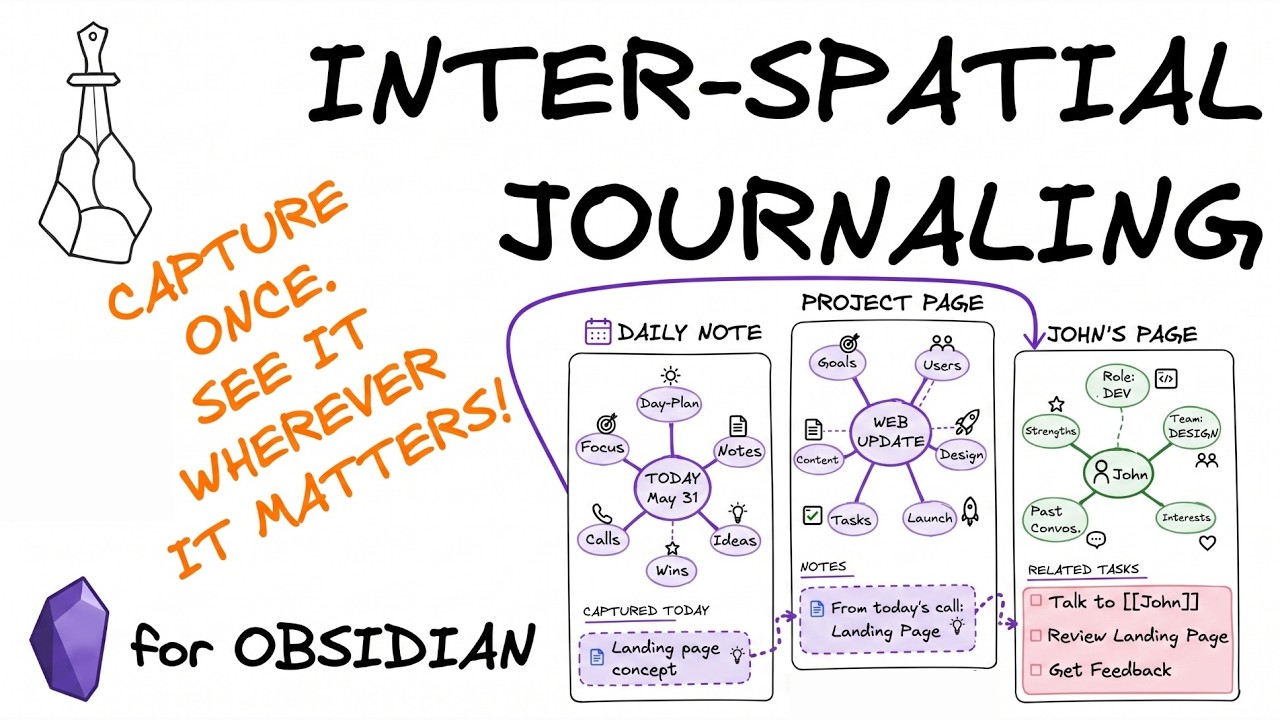
- The daily note page functions as a creative whiteboard for capturing daily ideas, while topical notes—such as those for projects, meetings, or books—are linked to the daily page but stored in their own specific locations 2m45s.
- This structure ensures that all relevant information remains visible in context, regardless of which note is opened 3m15s.
- The system incorporates "in-context task management," allowing tasks created on specific project or person pages to be filtered and viewed only when accessing those specific pages 3m30s.
Integration of Plugins and Ontologies
- The note-taking workflow integrates project-related notes into a daily note page using the Tasks plugin, note cards, and Excalidraw. 0s
- The daily note page features a log and an open space for typing or drawing, with individual notes on projects, books, people, or articles linked to the daily note via an ontology. 15s
- An ontology, visualized through Excalibrain, defines the relationship between the daily note and specific project or subject notes. 25s
- Markdown embeds are used to reference notes across different pages, such as project pages or individual contact pages, ensuring content is visible in its original location regardless of which document is opened. 42s
Capture Note Script and Demo Vault
- A "capture note" script is available for installation via the Obsidian tools panel and the Excalidraw script store. 1m12s
- A demo vault is provided to Sketch Your Mind community members, which includes pre-configured templates, markup, and Excalibrain settings to support the note-taking process. 1m55s
- To take a note, such as for a meeting, the capture note script can be triggered via a hotkey or the Obsidian Command palette. 2m35s
- The capture note interface allows users to input a name, select a short name, choose between a visual or markdown note format, and specify the desired ontology type. 2m45s
Practical Application of Capture and Mind Mapping
- A capture note function allows for the creation of meeting records, such as a coaching session with Bob, which automatically logs the current time and date 0s.
- Visual mind maps can be used to organize notes, and zooming out allows for the viewing and rearranging of previous notes or the addition of drawings and markup for further explanation 24s.
- Open tasks associated with a specific contact, such as Bob, can be reviewed directly within the note-taking interface, including details on project delivery delays and past due dates 1m5s.
- Notes can be linked to specific projects, such as the Sunflower Valley playground project, by using a keyboard shortcut to navigate to the project page while keeping the original meeting note accessible 1m35s.
- Project pages feature their own mind maps and task lists, allowing for the documentation of project-specific decisions, options, and follow-up items 2m5s.
Visual Board Management and Note Editing
- A capture note script can be used to adjust the frame around a note to ensure it fits the content, which assists in the logical arrangement of topics on a larger whiteboard 2m35s.
- Mind maps require a refresh to auto-arrange new notes, allowing users to visualize the entire history of discussions or project developments on a single board 2m52s.
- Textual markdown notes can be created as an alternative to visual mind maps, supporting standard formatting like bulleted lists and tables 3m15s.
- Markdown notes are integrated into the visual board and include a link back to their original source or context 3m35s.
- Notes embedded within the canvas can be edited directly on the daily page without leaving the whiteboard interface 0s.
Contextual Navigation and Community Engagement
- The system allows for the arrangement of various pages on a whiteboard, creating an ontology-based contextual mind map 14s.
- Users can navigate between different days and view interconnected information, such as coaching sessions, historical notes from one year prior, and project-related discussions 28s.
- The visual note-taking system maintains connections between different entities, such as specific playgrounds, town picnics, and the dates associated with those topics 45s.
- A session is scheduled for the first weekend in June to discuss this workflow with members of the Sketch Your Mind community and gather feedback 1m5s.
- A future video will be released for the Sketch Your Mind community detailing the setup of the demo vault 1m17s.
System Configuration and Community Overview
- The settings menu allows for the configuration of note type ontology, daily note and date formats, note type properties, visual templates, and sizing or embedding preferences 1m35s.
- The Sketch Your Mind community consists of approximately 150 members focused on personal knowledge management (PKM) and visual thinking 2m6s.
- The provided script is designed to be self-explanatory and functional out of the box, incorporating elements from existing templates for Excalidraw and GTD workflows 2m32s.