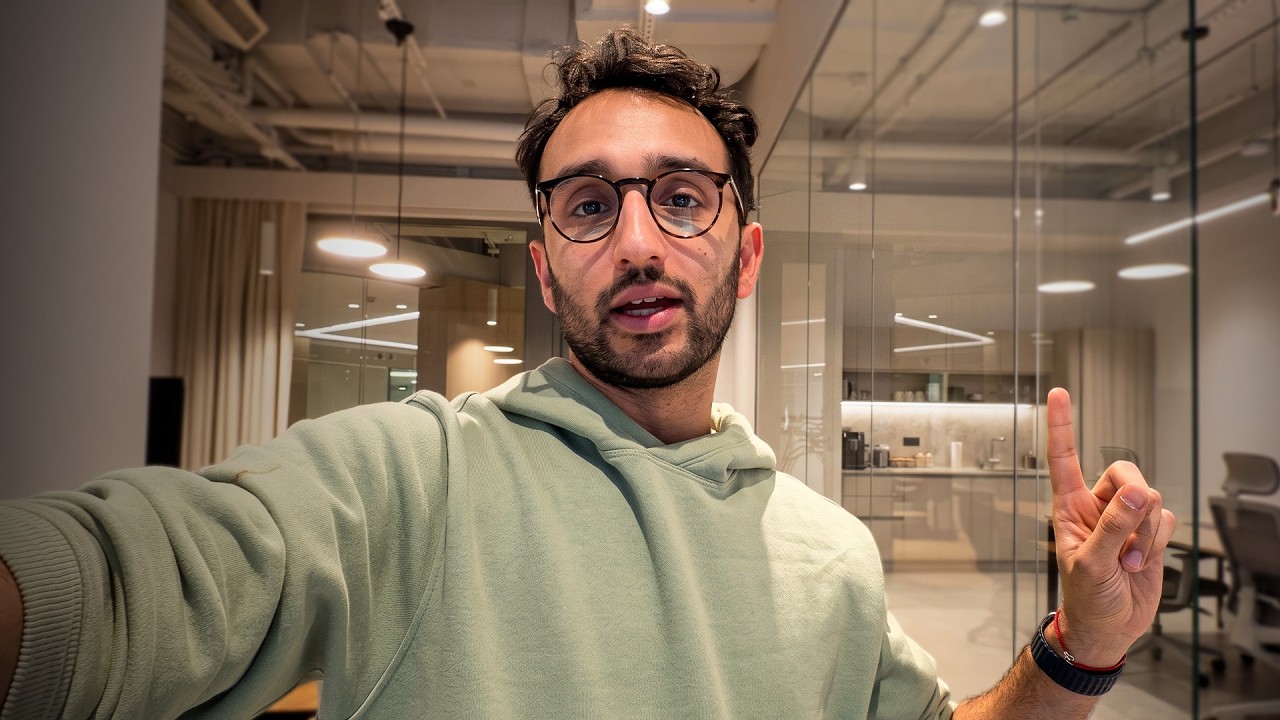


Basic Filming Techniques with a Phone
- To film oneself using just a phone, it is essential to find a light source that is as big as possible, such as a window, and position it at a 45-degree angle from the face 10s.
- Having an interesting background is also crucial, rather than just a plain white wall, to make the video more engaging and professional 2m6s.
- Keeping lines straight is vital to achieve a professional look, and this can be done by ensuring the camera is level and the subject's head is almost touching the top of the frame 4m30s.
- Experimenting with different camera angles, such as tilting, can create various effects, but generally, being eye-level with the camera and looking straight into the lens produces the most professional result 6m10s.
Camera Positioning and Selfie Camera Tips
- When filming with a phone, using the selfie camera can be convenient, but it may cause the subject to look at themselves instead of the camera, which can feel unnatural, so it is better to use the main camera and look directly into the lens 8m40s.
- Ali, a doctor turned entrepreneur, shares his experience and tips gained from being a content creator for 8 years and running the Part-Time YouTuber Academy, where he has helped thousands of students start and grow their YouTube channels 42s.
- When filming with a phone for the first time, a common mistake is looking at oneself instead of the camera, and to avoid this, it's essential to identify the camera's location, especially when using the back of the phone 10s.
- To determine the camera's location, one can use a technique such as covering each camera lens to find out which one is being used, and once identified, it's crucial to look directly at that camera to ensure a professional-looking video 42s.
Handheld Filming and Lens Choices
- For handheld filming with a phone, using the 0.5x lens can produce a nicer, more vlog-like effect, and it's essential to keep the camera straight and stable to avoid a wonky look 2m6s.
- When filming handheld, it's also important to consider the background and lighting, and to use general principles such as having a soft light source and a reasonable background to produce a visually appealing video 2m6s.
- There is a tool called Stanley, an AI agent that connects to Instagram and provides insights on how to grow one's business or presence on the platform, and it can also help create carousels, posts, and captions, saving time and effort 4m30s.
- Stanley offers features such as a consistency score, growth score, and stand score, which allow users to track their performance compared to other accounts and similar niches, and it is a recommended platform for selling products as a creator on the internet 5m40s.
- Handheld filming without stabilization can look unprofessional, and it's essential to use techniques such as being one's own stabilizer or using a stabilizing device to produce a high-quality video 7m10s.
Tripod Use and Eye-Level Framing
- A phone tripod, such as the Peak Design phone tripod, can be useful for hands-free filming or video calls, and can be easily attached to a phone at all times 10s.
- When using a tripod with a phone's selfie camera, it's common to end up with a shot that's not at eye level, but this can still look professional if done correctly, without too much headroom 42s.
- To achieve a professional-looking shot, it's essential to look directly at the camera and have a reasonable amount of headroom, avoiding too much or too little headroom, which can make the shot look unprofessional 1m6s.
- If a tripod is not available, everyday objects like a box of tissues can be used as a makeshift tripod to achieve a more eye-level shot, and phones with basic selfie cameras can still produce good results 2m6s.
Camera Settings and Focal Lengths
- Switching to the phone's proper camera, such as the 1x lens, can also produce reasonable results, especially when combined with sensible filming practices like looking at the camera and having an interesting background 3m42s.
- Having an interesting background, rather than a completely empty one, can actually make a shot look more professional, and filming against a plain wall can be a sign of inexperience as a creator 5m6s.
- When filming, having something in the background is generally more visually appealing than having an empty wall, and shooting at an oblique angle, such as into a corner, can make the background more interesting 10s.
- To achieve a more cinematic look, it is recommended to shoot at 24 or 25 frames per second, as most movies are shot in these frame rates, whereas phone footage is often shot at 30 frames per second 2m6s.
- For beginner creators, it is not necessary to worry about filming in cinematic mode, professional mode, or raw mode, and the default camera app on a phone is sufficient for basic video creation 4m30s.
- Using a phone's various focal lengths, such as 0.5x or 1x, can affect the intimacy of the video, with closer cameras creating a more intimate experience for the viewer 6m40s.
- The 0.5x lens can make the video feel more up close and personal, while the 1x lens may feel less intimate, even with similar framing 8m20s.
- The 1x lens on an iPhone is equivalent to a 24mm lens, which is often used to create a classic YouTuber vibe, and it allows the viewer to feel like they can reach out and touch the camera 10s.
- Switching to the 2x zoom lens creates a more presenter-like feel, similar to a newsreader, where the camera is farther away from the subject, and this can be achieved with the iPhone without needing additional equipment 42s.
Lighting and Framing for Professional Results
- Using a phone to film eliminates the need to think too hard about lighting, as the phone can compensate for most lighting conditions, as long as the subject is framed reasonably, with their head brushing the top of the frame and something interesting in the background 2m6s.
- Audio quality is an important aspect of filming, and using a microphone, such as the one attached to the Sony ZV1 camera, can significantly improve the audio quality, with the main factor being the proximity of the microphone to the subject's mouth 4m30s.
- The closer the microphone is to the subject's mouth, the better the audio quality will be, and this can be demonstrated by comparing the audio quality of the iPhone at different distances, with the 0.5x distance producing the most intimate and best-sounding audio 6m40s.
Audio Quality and Microphone Tips
- The iPhone's audio quality improves significantly when the camera is brought closer to the subject, with the 1x lens and 0.5x distance producing better audio than the 2x zoom lens, which can sound terrible due to the increased distance 8m10s.
- When filming with a phone or camera without an external microphone, using a 0.5x zoom and keeping the microphone close to the subject can improve audio quality, which is more important than video quality, as people are more likely to tolerate poor video quality than bad audio 10s.
- Carrying a pair of earbuds, such as the old school wired Apple headphones, can provide reasonable sounding audio in a pinch, and using a microphone close to the mouth can result in good audio quality 1m5s.
- For better audio, carrying a proper microphone is an option, and it can be plugged into a laptop, allowing for higher quality audio recording, such as with the Mantis Pod microphone 2m6s.
Setup and Equipment for Professional-Looking Shots
- To set up a shot, using a tripod, such as the iPhone tripod attachment on the Mantis Pod, can help achieve a more professional look, and ensuring the lines in the shot are straight is crucial for a professional appearance 3m30s.
- Adding a foreground element, such as a laptop with a colorful skin, like the Dbrand skin, can make the shot more interesting, and taking the time to adjust the setup to make it look reasonable is important for creating a professional vibe 5m40s.
- Adjusting the shot to minimize headroom and ensure the laptop is visible can also improve the overall appearance of the shot, and making these adjustments can help create a more professional-looking video 7m20s.
Low-Budget Filming Setups and Trade-Offs
- The setup for recording videos can be done with minimal equipment, and it's all about making trade-offs to achieve a reasonable look, considering factors such as camera position, microphone placement, and lighting, which in this case is not ideal, with harsh yellow lighting 10s.
- A phone can be used as the primary camera, and with a cheap tripod, a laptop, and a microphone, it's possible to create a filming setup that looks reasonable, even for an entire YouTube channel, by using the selfie camera and recording audio on the laptop 2m6s.
- The background and lighting may not be perfect, but the iPhone can compensate for poor lighting, adding some noise to the recording, and the shot can still look fine, even with harsh shadows on the face 4m30s.
- The setup can be simplified even further by using earphones as a microphone, plugging them into the laptop or phone, and hiding them under clothing to achieve relatively reasonable sounding audio 6m40s.
- With just a phone and a cheap tripod, or even propping the phone up on books or other objects, it's possible to create a low-tech setup that can produce reasonable-looking content, making gear not an excuse for not creating content 9m20s.
Vertical Content and Authenticity in Modern Filming
- This setup can also be used for vertical content, such as Instagram reels, where people are often more forgiving of poor production value, and the focus is on the content rather than the production quality 11m50s.
- Using a phone to film content, such as Instagram reels or YouTube shorts, can create a more authentic feel due to its lower production value, which is beneficial in today's era where authenticity is valued 10s.
- Having good audio is important, and using a simple pair of earbuds can be sufficient, while lighting is not as crucial if the goal is to create a natural and raw feel 2m6s.
- In the past, high production value was a way to separate oneself from amateur content creators, but now, having less polished production value can be advantageous as it feels more authentic in a time where people are skeptical of what is real and what is fake 42s.
Artistic Rule-Breaking and Intentional Style
- Some creators deliberately add grain and noise to their videos to make them appear as if they were filmed with a less fancy camera, and knowing the rules of video creation, such as straight lines and eye level, can allow for artistic and intentional breaking of those rules 4m30s.
- Artistically breaking the rules of video creation, such as using a wonky camera angle or a wide-angle shot, can create a unique vibe and lean into a point-of-view style, as seen in the work of creators like Daniel Dalen 6m20s.
- Understanding the rules and conventions of video creation is key to making intentional artistic choices, rather than simply creating unprofessional-looking content 8m0s.
Introduction or Greeting Message
- There is no relevant information provided in the given text to create a comprehensive summary, as the text appears to be incomplete and only contains a greeting and a farewell message 0s.


