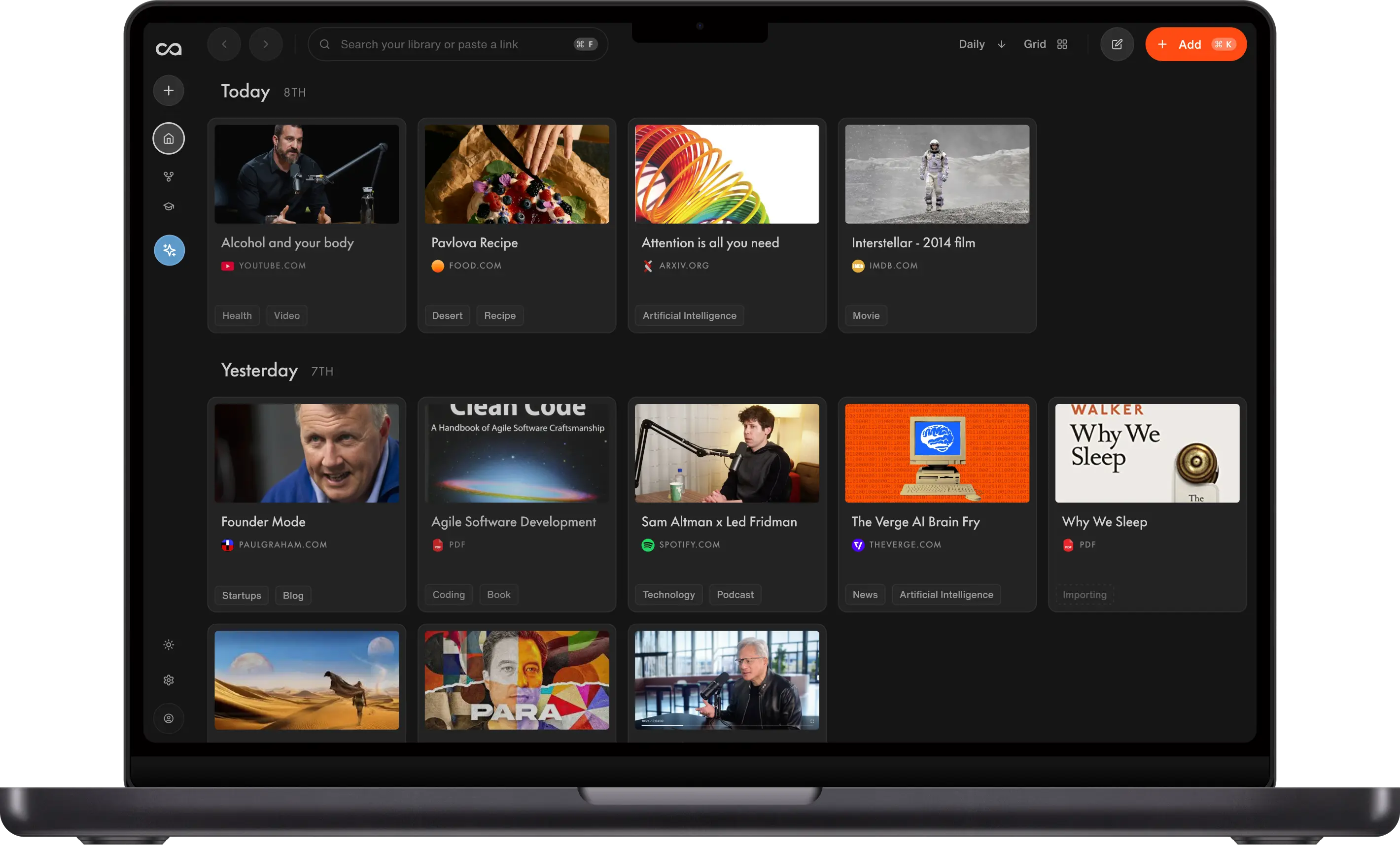
4 Best Read-It-Later Apps in 2026, Ranked by Use Case
The unread graveyard is the real problem with read-it-later apps, not the save button. We ranked four by how unused saves stay useful: Recall for full-content save, summaries, and library-wide chat, Readwise Reader for highlights, Instapaper for a classic queue, and Matter for audio-friendly reading.
Last updated: August 2026
What is the best read-it-later app?
The best read-it-later apps in 2026 are Recall for a personal AI knowledge base that organizes everything you save and lets you chat across all of it, Readwise Reader for a dedicated reader with highlights, Instapaper for classic distraction-free reading, and Matter for audio-friendly reading.
People are looking harder for read-it-later apps after Pocket shut down. The real problem is older than Pocket: most queues become a read-it-later graveyard. You save more than you finish, the unread count climbs, and the archive stops answering questions when you need it.
Common triggers:
- Tab overload: Dozens of articles open "to read later"
- Newsletter backlog: Good writing arrives faster than you can finish it
- Queue guilt: Saves accumulate without a way to use them unread
- No retrieval: You remember saving something and cannot find it months later
- No chat: The app stores links, but you cannot ask what you already saved
Recall treats read-it-later as a library you can chat with, not only a pile to finish. Full-content storage, AI summaries on save, library-wide chat, and spaced repetition mean a save still has value even when you never read every article end to end. The other tools win when you mainly want a beautiful dedicated reader or audio playback.
What to use when
- Recall if read-it-later should become a personal AI knowledge base with summaries, chat, and retention.
- Readwise Reader if you want a dedicated reader with strong highlights and Readwise sync into your notes system.
- Instapaper if you want a classic, distraction-free reading experience.
- Matter if listening to articles and a modern social/reading workflow matter.
Get started with Recall for free
See why Recall is the best Pocket alternative: full-content save, AI summaries, and a knowledge base you can chat with.
Best read-it-later apps compared (2026): ranked by knowledge type, how unread saves compound, chat, and the main tradeoff.
| App | Best for | Knowledge type | How knowledge compounds | Chat / retention | Main tradeoff |
|---|---|---|---|---|---|
| Recall | Personal AI knowledge base | Articles, video, PDFs, podcasts | Summaries, library chat, and spaced repetition even if unread | ✓ chat + spaced repetition | Not a dedicated highlight-first reader |
| Readwise Reader | Dedicated reader + Readwise sync | Articles, PDFs, newsletters | Highlights and sync into your notes system | ~ via Readwise workflow | Value still leans on finishing reads |
| Instapaper | Classic distraction-free reading | Articles | A clean queue and highlights on paid plans | ✗ | No chat layer, so unread saves rot |
| Matter | Audio-friendly modern reading | Articles and newsletters | Audio playback, highlights, and sharing | ~ | Weaker as a lasting knowledge base |
Legend: ✓ strong fit · ✗ gap · ~ partial. Scroll horizontally on small screens.
Related: Pocket alternative · best AI bookmark managers · best Chrome extensions for reading · best AI knowledge bases
What is a read-it-later app?
A read-it-later app saves articles, newsletters, and sometimes PDFs into a clean reading queue so you can finish them away from the original website. The core loop is save now, read later.
In 2026, the best read-it-later apps increasingly add:
- Full-content storage so the page still exists if the site changes
- Highlights and notes for what mattered
- AI summaries to triage the queue
- Export or sync into a notes or knowledge system
- Retention so reading compounds instead of disappearing
Read-it-later apps like Instapaper and Matter are built to save articles for later. Recall acts as your read-it-later app too, but goes further: it saves articles, podcasts, videos, PDFs, and notes, summarizes them automatically, and turns them into a searchable, chat-ready knowledge base instead of a queue you never get to.
Why read-it-later apps become a graveyard
Almost everyone who uses a read-it-later app eventually hits the same failure mode: a graveyard of unread saves.
It is not a willpower problem. It is a design problem.
Saving is cheap. One click, share sheet done. Reading is expensive. A long article needs focus, time, and the right mood. Newsletters and tabs arrive faster than any realistic reading pace, so the unread count grows. After a few months the queue feels heavy, so you stop opening it. The articles you meant to learn from sit there as titles and URLs, while you re-Google the same topics or ask a generic chatbot that has never seen what you already saved.
Classic read-it-later apps optimize the front of that loop: clean capture, a nice reader, offline access. That still helps when you finish most of what you save. It fails when the job is not "empty the inbox" but "use what I already collected."
A graveyard forms when:
- Success is defined as finishing every article. Anything unread feels like debt.
- Value is locked behind a full read. If you never open the piece, you get nothing from it.
- Search only works if you remember the title. You need the idea, not the headline from six months ago.
- There is no conversation layer. You cannot ask the archive a question and get an answer from your own sources.
Highlights and tags help power users. They do not fix the core mismatch: you will always save more than you can carefully read.
Why chat matters more than finishing the queue
The way out of the graveyard is not a stricter reading schedule. It is changing what a save is for.
Chat is the feature that makes unread content useful. When you can ask your library questions, a saved article does not have to wait for a perfect quiet hour. You can pull the argument, the numbers, the counterpoint, or the comparison across ten pieces you saved last quarter without rereading each one from the top.
That is a different product job from a reader view:
| Reader-first loop | Chat-first loop |
|---|---|
| Save → hope to read later → maybe finish | Save → summarize → ask when you need it |
| Value arrives only if you open the article | Value arrives when you have a question |
| Archive is a guilt pile | Archive is a personal knowledge base you can query |
| AI (if any) helps inside one document | AI answers across the whole library, with citations |
Chat matters because:
- You will never finish the queue. Accept that, then design for it. Chat turns partial reading into usable knowledge.
- Questions arrive at the wrong time for deep reading. Before a meeting, while drafting, mid-research. Chat is how you use the library in those moments.
- Generic AI chat has no memory of your saves. ChatGPT and Claude do not know the articles in your read-later app unless you paste them in. Library-wide chat starts from what you already trusted enough to save.
- One answer can span many sources. "What have I saved about pricing?" or "Compare the arguments in these research pieces" is a chat job, not a scroll job.
- Citations keep trust. The best chat points back to your saved articles so you can verify, not invent.
Summaries help triage. Highlights help annotate. Chat is what stops the archive from rotting. If a read-it-later app cannot answer questions across what you saved, it is still mostly a queue, no matter how polished the reader feels.
This is why Recall ranks first here. It still saves and summarizes like a modern read-it-later app, but the center of gravity is library-wide chat: ask across articles, PDFs, videos, and podcasts you saved, get answers grounded in your sources, and keep spaced repetition for what you want to remember. Finish articles when you want a deep read. Chat when you need the knowledge now.
How to choose a read-it-later app
Choose based on whether you need a queue to finish or a library you can chat with.
- Chat across the library: If you want to avoid a graveyard, prioritize apps that let you ask questions over everything you saved, not only open one article at a time.
- Queue vs knowledge base: Do you mainly need an inbox to empty, or a library that compounds even when unread?
- Formats: Articles only, or also newsletters, PDFs, YouTube, and podcasts?
- AI layer: Summaries triage the pile; chat is what makes the pile usable.
- Highlights: Critical if you rewrite notes elsewhere (Readwise ecosystem).
- Audio: Matter is strongest when you listen as often as you read.
- Platform: Cross-platform web and extension capture vs app-first readers.
- Product stability: Prefer tools with a clear ongoing roadmap if you rely on them daily. Pocket's shutdown made this harder to ignore.
Best read-it-later apps in detail
1. Recall
Recall is best for: people who want a personal AI knowledge base instead of a read-it-later graveyard: save anything, then chat across the library when a question shows up.
Recall features:
- Full-content save: Articles, PDFs, YouTube, podcasts, and notes
- AI summaries on save: Triage what is worth a full read without opening everything
- Library-wide chat: Ask questions across everything you saved, with citations back to your sources
- Automatic organization: Tags and connections without manual folders
- Spaced repetition: Retain what mattered after you read or chat
Recall pricing: free tier with unlimited saves; Plus from about $10/mo.
Knowledge type: Articles, PDFs, YouTube, podcasts, and notes in one library.
How knowledge compounds: Summaries, library-wide chat, and spaced repetition make unread and half-read saves useful when a question arrives. Tradeoff: it is not a highlight-first dedicated reader.
Where Recall fits: Most read-it-later apps optimize the queue and hope you finish it. Recall assumes you will not. Library-wide chat is the point: the archive stays useful unread, half-read, or fully read.
2. Readwise Reader
Readwise Reader is best for: a dedicated reading app with strong highlights and sync into the broader Readwise ecosystem.
Readwise Reader features:
- Reader-first design: Built for long articles, newsletters, and documents
- Highlights: First-class highlight workflows
- Readwise sync: Push highlights into notes tools you already use
- Feed and newsletter workflows: Strong for serious readers
Readwise Reader pricing: typically bundled with Readwise plans from about $8 to $10/mo. Verify current packaging on readwise.io.
Knowledge type: Articles, newsletters, PDFs, and highlights.
How knowledge compounds: Highlights and Readwise sync move passages into your notes system. Tradeoff: value still leans on finishing reads and exporting.
Readwise Reader vs Recall: Readwise Reader wins as a polished dedicated reader with highlight sync. Recall wins when you want AI summaries, multimedia capture, and chat across the full library without a separate notes export step.
3. Instapaper
Instapaper is best for: classic distraction-free reading with a calm, text-first experience.
Instapaper features:
- Distraction-free reader: Minimal interface for focus
- Speed reading and text tools: Long-time reader utilities
- Highlights and notes: On paid plans
- Cross-device sync: Phone, tablet, and web
Instapaper pricing: free tier; Premium from about $3/mo.
Knowledge type: Articles in a clean reading queue.
How knowledge compounds: A distraction-free reader and highlights on paid plans help if you finish the queue. Tradeoff: there is no chat layer, so unread saves still rot.
Instapaper vs Recall: Instapaper wins for focused article reading. Recall wins when the save should also be summarized, connected, and available to AI chat later.
4. Matter
Matter is best for: modern reading workflows with strong audio playback so you can listen to articles as well as read them.
Matter features:
- Audio for articles: Listen when you cannot read
- Highlights and sharing: Social and annotation features
- Newsletter support: Common read-later intake path
- Modern mobile apps: Reader experience designed for phones
Matter pricing: free tier; Premium typically about $8/mo or about $80/year depending on plan and region. Verify current pricing on hq.getmatter.com.
Knowledge type: Articles and newsletters, with strong audio playback.
How knowledge compounds: Listening, highlights, and sharing help you consume more of the queue. Tradeoff: it is weaker as a lasting knowledge base you can query later.
Matter vs Recall: Matter wins for audio-first reading. Recall wins for turning the same saves into a broader AI knowledge base across formats.
Bottom line
Choose Recall when you want a read-it-later app that solves the graveyard problem: full-content saves, summaries on capture, and library-wide chat so you can use what you saved without finishing every article. Pick Readwise Reader for highlight-centric reading, Instapaper for a classic distraction-free queue, and Matter for audio.
If you are leaving Pocket specifically, start with Pocket alternative.
When a basic reading queue is enough
Stay with a simple read-it-later app when:
- You finish most of what you save
- You mainly need a clean reader view
- You rarely need to ask questions across old saves
Upgrade when the unread pile is growing and you need chat across your library, not another prettier inbox.
FAQs
Best read-it-later app by use case
What is a read-it-later app
Recall vs other read-it-later apps
See more tools on the Recall comparison hub or the full comparison table.
Ready to get started?
Save, summarize and chat with your content.
No credit card required · 30 Day Refund on Premium · 24 Hour Support