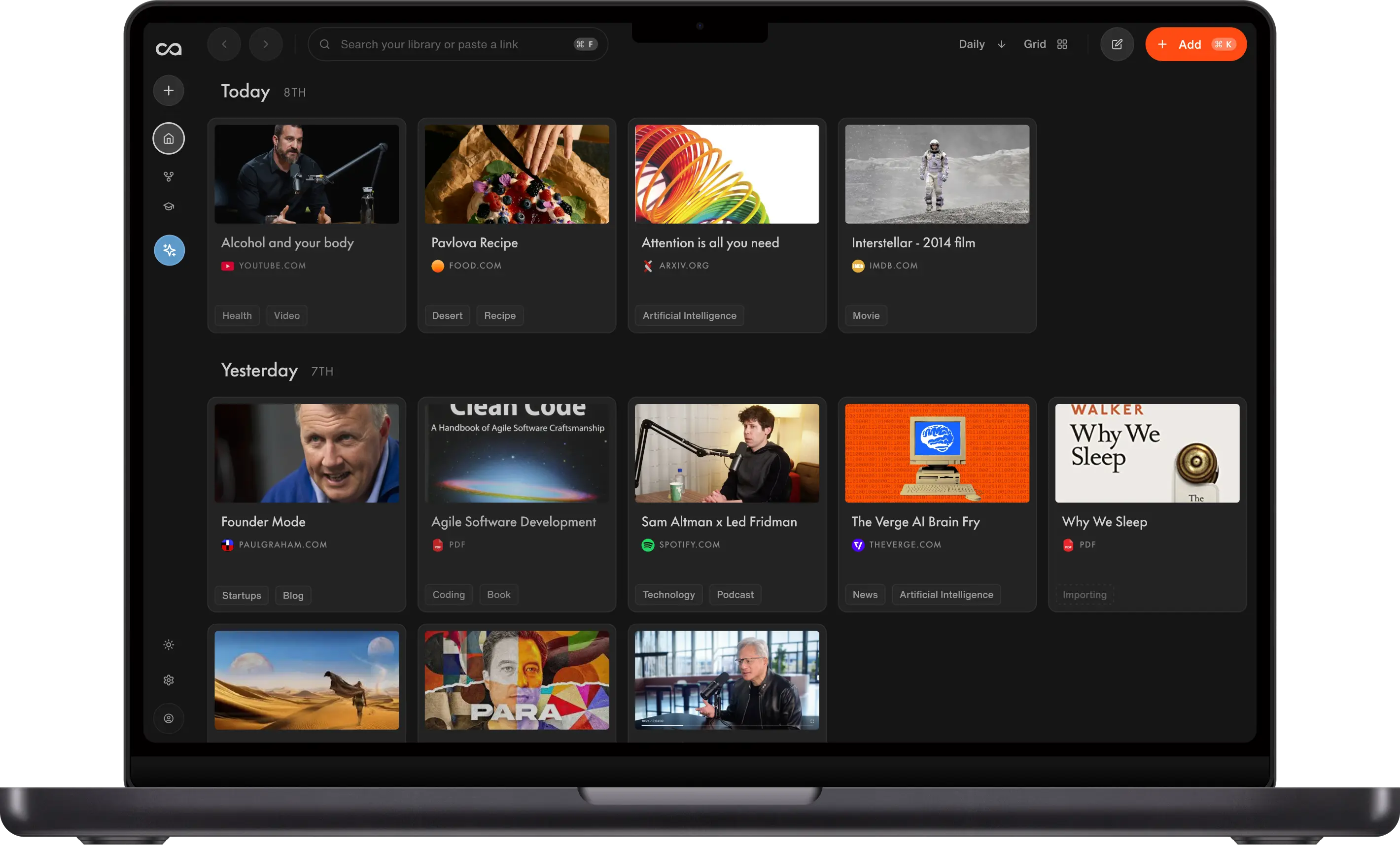
7 Best AI Knowledge Bases in 2026, Ranked by Use Case
Most AI knowledge bases store what you save and never bring it back into chat. We ranked seven by capture, compounding value, and library-wide chat: Recall for one-click web capture plus chat across the whole library, NotebookLM for bounded research notebooks, Mem for AI work notes, Notion AI for team wikis, and Obsidian for a local vault.
Last updated: August 2026
What is the best AI knowledge base?
The best AI knowledge bases in 2026 are Recall for an unlimited personal library that combines your own notes and saves, then lets you chat across all of it, NotebookLM for bounded research notebooks, Mem for AI work notes, Notion AI for team workspaces, Obsidian + AI for local-first DIY, Capacities for object PKM, and Tana for structured outliners. In Recall, capture articles, videos, podcasts, PDFs, and notes, get summaries on save, and chat across the full library so a source from last year can answer a question today.
People search for AI knowledge bases when chatbots alone are not enough. Common triggers:
- No memory of what you saved: General chatbots answer from the open web, not from your articles, PDFs, and notes
- Capture friction: Saving YouTube, podcasts, PDFs, and articles still feels bolted on
- Manual organization: Folders and tags need constant upkeep or the library becomes unsearchable
- Scoped AI: Chat works inside one notebook or page, not across your full archive
- Compounding value: Saved knowledge never resurfaces when a new question arrives
Choose Recall when you want a personal AI knowledge base for lifelong learning. The other six tools each fit a different job: bounded research, work notes, team docs, local ownership, typed objects, or outliner power use.
What to use when
- Recall if you want one growing library for articles, YouTube, podcasts, PDFs, and notes, with AI summaries on save, automatic organization, and library-wide chat.
- NotebookLM if your work stays inside one bounded research notebook in Google's ecosystem.
- Mem if your week runs on meetings, calendar context, and fast AI notes more than a lifelong multimedia archive.
- Notion AI if you need team wikis, databases, and shared docs you are willing to structure yourself.
- Obsidian + AI if you want local Markdown files you own and will maintain your own AI workflow.
- Capacities if you think in typed objects (people, books, meetings) rather than a capture-first library.
- Tana if voice notes, supertags, and outliner workflows are central to how you work.
Get started with Recall for free
See why Recall is the best AI knowledge base: one-click capture, automatic organization, and chat across everything you save.
Best AI knowledge bases compared (2026): ranked by knowledge type, how saved knowledge compounds, AI features, and the main tradeoff.
| Knowledge base | Best for | Knowledge type | How knowledge compounds | AI features | Main tradeoff |
|---|---|---|---|---|---|
| Recall | Personal AI knowledge base | Web, video, PDFs, podcasts, and notes | Chat cites your saved sources first, so old saves return | Summaries, chat across sources or the web, and MCP | Not local-first |
| NotebookLM | Bounded research notebooks | Uploaded source sets | Citation-backed Q&A, study guides, and audio overviews | Chat, study guides, and audio overviews in one notebook | Scope resets per notebook |
| Mem | AI work notes and meetings | Notes, meetings, and brain dumps | AI search, related notes, and chat over your week | Auto-organization and chat on work notes | Weaker long-term web archive |
| Notion AI | Team docs and wikis | Pages, docs, databases, and wikis | Search, relations, templates, and Notion AI | Notion AI on pages you maintain | Manual structure and workspace sprawl |
| Obsidian + AI | Local-first DIY control | Markdown notes and files | Backlinks, graph, plugins, and a DIY AI layer | Plugins or a DIY Claude/MCP setup | Requires setup and maintenance |
| Capacities | Object-based personal PKM | People, books, meetings, and topics | Object links, graph, daily notes, and AI assistance | AI assistance on objects you maintain | No local file ownership |
| Tana | Supertags and outliner workflows | Nodes, fields, and meetings | Supertags, live queries, and AI commands | AI commands on nodes you configure | Steep learning curve |
Legend: ✓ strong fit · ✗ gap · ~ partial. Scroll horizontally on small screens.
Related guides: best NotebookLM alternatives, best second brain apps, and Recall vs NotebookLM.
What is an AI knowledge base?
An AI knowledge base is a system that stores what you learn and uses AI to summarize, organize, search, and chat with that stored knowledge. Unlike a general AI chatbot, it is grounded in sources you choose to keep.
A strong AI knowledge base usually combines:
- Capture: Save articles, videos, podcasts, PDFs, and notes with low friction
- Distill: Summaries and highlights so you do not reread everything
- Organize: Tags, graphs, or objects that keep retrieval working at scale
- Retrieve: Semantic search and chat that cite your saved sources
- Reuse: Notes, review, and workflows that turn storage into compounding value
AI knowledge base vs AI chatbot
| AI chatbot | AI knowledge base | |
|---|---|---|
| Primary context | Public training data and optional live web | Your saved articles, notes, PDFs, and media |
| Persistence | Conversation history, not a lasting library | One growing archive you can revisit for years |
| Best job | Fast answers, drafting, general reasoning | Grounded answers from what you personally saved |
| Example | ChatGPT, Claude, Gemini | Recall, NotebookLM, Obsidian + AI |
For a chatbot-focused ranking, see best AI chatbots. For ChatGPT-specific alternatives, see best ChatGPT alternatives.
Why your own context matters more than the open web alone
Most people use AI the same way every day: open a chatbot, ask a question, get an answer pulled from the open web or a generic model. That is useful for a quick fact. It is a weak way to build knowledge over weeks and years, because tomorrow the model starts from scratch again while your articles, notes, and research sit unused in tabs and folders.
Andrej Karpathy named the better pattern in a viral thread on LLM knowledge bases. His point was simple and widely echoed: AI is far more useful when it can answer from your own knowledge, not just the internet. He described an LLM wiki workflow where you ingest sources, let the model compile summaries and cross-links, then ask complex questions against that growing personal layer instead of re-uploading files every session. In his words, a large share of his recent token use was going into "manipulating knowledge" rather than only manipulating code, and he closed by saying there is room for "an incredible new product instead of a hacky collection of scripts."
That message is why AI knowledge bases belong in a different category from chatbots and web search. The open web is shared context. Your library is your context: the papers you trusted, the videos you finished, the notes you wrote, the contradictions you already resolved. When AI answers from that archive first, learning compounds. When it only pulls from the internet, you keep rediscovering the same ground.
We walk through Karpathy's five-step pattern and how to run it without scripts in our guide: What is Andrej Karpathy's LLM wiki? Set it up with no code. For a product-shaped version of the same idea, see also LLM wiki with Recall.
How to choose an AI knowledge base
Match the tool to how you actually learn and work:
- Knowledge type: Recall is strongest for web, video, podcasts, PDFs, and notes. NotebookLM fits uploaded source sets. Mem and Notion fit work notes and docs. Obsidian fits local Markdown.
- Chat scope: Prefer library-wide chat (Recall) over notebook-scoped or page-scoped AI when knowledge should compound across years.
- Capture surface: One-click browser and mobile save beats paste-and-upload when you learn from the open web.
- Automation vs structure: Recall and Mem auto-organize as you save. Notion, Obsidian, Capacities, and Tana expect more system design.
- Ownership: Obsidian is strongest when local-first files matter more than turnkey AI.
- Research vs archive: Prefer a knowledge base when answers should come from sources you already saved and trust, not only from a fresh open-web search.
Best AI knowledge bases in detail
1. Recall
Recall is best for: people who want a personal AI knowledge base that turns saved content into lasting value, not another archive they never reopen.
Recall features:
- One-click capture: Save articles, YouTube, podcasts, PDFs, and notes from Chrome, Firefox, or mobile
- AI summaries on save: Every source gets a useful summary without a manual distill step
- Automatic organization: Smart tags and a knowledge graph connect related saves
- Library-wide chat: Ask questions across everything you stored, with citations to your sources
- Multi-model AI: Chat with leading models on your library or the open web
- Spaced repetition: Review what matters on a schedule
Recall pricing: free tier with unlimited saves; Plus from about $10/mo for full AI and library chat.
Knowledge type: Recall stores articles, YouTube videos, podcasts, PDFs, webpages, and your own notes in one library.
How knowledge compounds: Semantic search, a knowledge graph, library-wide chat, quizzes, and spaced repetition make old saves useful again. Chat cites your own sources first, so a video or PDF from years ago can become evidence for a question today. Tradeoff: it is not local-first.
Where Recall fits: Most "AI knowledge" tools are either chatbots without a library or notes apps with AI bolted on. Recall is built as the library first: capture, summarize, organize, then chat.
Go deeper: NotebookLM alternative comparison · ChatGPT alternative comparison
2. NotebookLM
NotebookLM is best for: bounded research projects where you upload a defined source set and want citation-grounded answers inside one notebook.
NotebookLM features:
- Source-grounded chat: Answers tied to the files and links you add to a notebook
- Study aids: Summaries, guides, mind maps, and audio overviews
- Google ecosystem fit: Works naturally with Drive, Docs, and Gemini
- Project scope: Strong when the corpus is intentionally limited
NotebookLM pricing: free tier; higher limits through Google AI plans.
Knowledge type: Uploaded source sets: PDFs, Google Docs, websites, pasted text, and YouTube with captions.
How knowledge compounds: Chat, citations, study guides, timelines, mind maps, and audio overviews make one bounded source set more useful. Tradeoff: the notebook resets scope, so it is not a lifelong archive.
NotebookLM vs Recall: NotebookLM is excellent inside one project notebook. Recall is stronger when knowledge should accumulate across years without per-notebook source caps or Gemini-only research chat.
Google's AI tools also include Google AI Edge Foresight, which focuses on live meetings and local reference files on a Mac. Our Foresight versus second-brain comparison tests transcription, summaries, source imports, and chat to help you decide whether its meeting workflow fits your needs.
3. Mem
Mem is best for: AI-native work notes tied to your calendar and week more than a lifelong multimedia learning library.
Mem features:
- AI search and chat: Find and ask across notes quickly
- Meeting and calendar hooks: Context from how you actually work
- Automatic organization: Related notes surface without heavy filing
- Fast capture: Brain dumps and clipped ideas with AI cleanup
Mem pricing: free tier with limits; paid from about $10/mo.
Knowledge type: Notes, meetings, voice input, calendar context, and brain dumps.
How knowledge compounds: AI search, related notes, and chat help this week's captures become context later. Tradeoff: you get less visible structure than in Obsidian, Tana, or Notion.
Mem vs Recall: Mem is lighter for personal work notes and meetings. Recall is stronger for articles, videos, podcasts, PDFs, and library-wide learning chat.
4. Notion AI
Notion AI is best for: teams and individuals who want a flexible workspace for docs, wikis, and databases, with AI inside the pages they author.
Notion AI features:
- Block editor and databases: Pages, properties, views, and relations
- Team workspaces: Shared knowledge with permissions and templates
- Notion AI: Draft, summarize, and edit inside authored pages
- Integrations: Slack, GitHub, Drive, and common SaaS tools
Notion pricing: free personal plan; Plus from about $10/mo.
Knowledge type: Pages, docs, databases, wikis, templates, and dashboards.
How knowledge compounds: Database views, relations, search, templates, and Notion AI can make structured knowledge reusable. Tradeoff: without maintenance, workspaces sprawl.
Notion vs Recall: Notion wins for team wikis and custom databases. Recall wins as a personal AI knowledge base without building the system first. See best Notion alternatives.
5. Obsidian + AI
Obsidian + AI is best for: technical users who want a local Markdown vault they own, plus plugins or external AI tools on top.
Obsidian features:
- Local Markdown files: Portable notes on your device
- Graph and backlinks: Manual and plugin-assisted connections
- Plugin ecosystem: Canvas, Web Clipper, community AI add-ons
- DIY AI workflows: Pair with Claude, ChatGPT, or MCP-style setups
Obsidian pricing: app free for personal use; Sync/Publish and AI add-ons cost extra.
Knowledge type: Local Markdown notes, files, links, canvases, and plugin-generated views.
How knowledge compounds: Backlinks, graph view, search, Canvas, and AI plugins can make old notes useful again. Tradeoff: the compounding power depends on how well you maintain the vault.
Obsidian vs Recall: Obsidian wins on local-first ownership and customization. Recall wins when you want capture, summaries, organization, and chat without building the stack yourself.
6. Capacities
Capacities is best for: structured personal knowledge with typed objects instead of endless nested pages.
Capacities features:
- Object types: People, books, meetings, and ideas as first-class types
- Graph and backlinks: Connect objects without a full database schema
- Calendar and daily notes: Time-based personal PKM views
- AI on paid tiers: Assistance inside the app after you upgrade
Capacities pricing: free tier; Pro from about $12/mo on annual billing.
Knowledge type: Typed objects: people, books, meetings, projects, topics, and notes.
How knowledge compounds: Object links, backlinks, graph views, and daily notes make knowledge reusable by type. Tradeoff: it is not local-first and has a smaller ecosystem than Obsidian or Notion.
Capacities vs Recall: Capacities fits note-first object PKM. Recall fits capture-first learning from the web with library-wide AI chat.
7. Tana
Tana is best for: outliner power users who want supertags, voice notes, and structured nodes.
Tana features:
- Supertags: Reusable schemas for meetings, people, and projects
- Outliner UI: Nested bullets with live search across the graph
- Voice capture: Strong meeting and spoken-note workflows
- AI on paid plans: Generation and assistance after you subscribe
Tana pricing: paid plans from about $16/mo on annual billing.
Knowledge type: Nodes, fields, meetings, projects, people, and custom supertags.
How knowledge compounds: Supertags, live queries, and AI commands can turn notes into a living operational graph. Tradeoff: you design the system, so the learning curve is real.
Tana vs Recall: Tana fits meeting-heavy structured thinking. Recall fits multimedia capture and library-wide learning chat without an outliner learning curve.
Bottom line
Choose Recall when you want an AI knowledge base that saves what you learn and makes it usable again: one-click capture, summaries on save, automatic organization, and chat across your full library with the AI model you choose. Pick NotebookLM for bounded Google-native research, Mem for work notes, Notion AI for team wikis, Obsidian + AI for local-first control, Capacities for object PKM, and Tana for outliner power users.
When a chatbot is enough
Stay with a general AI chatbot when:
- You need a fast answer and do not care which of your past sources it came from
- The task is drafting, coding help, or brainstorming without a personal corpus
- You are not ready to build a save habit yet
Move to an AI knowledge base when answers should come from what you personally saved, and that library should get more valuable over time.
FAQs
Best AI knowledge base by use case
What is an AI knowledge base
Recall vs other AI knowledge bases
See more tools on the Recall comparison hub or the full comparison table.
Ready to get started?
Save, summarize and chat with your content.
No credit card required · 30 Day Refund on Premium · 24 Hour Support