8 Best Evernote Alternatives in 2026, Ranked by Use Case
Evernote notebooks store clips well, then leave retrieval to you. We ranked eight alternatives by how knowledge compounds after the clip: Recall for a personal AI knowledge base you can chat across from your clips and notes, Notion for workspaces, OneNote for handwriting, and Obsidian for local files.
Last updated: August 2026
What are the best Evernote alternatives?
The best Evernote alternatives in 2026 are Recall for a personal AI knowledge base you can chat across from your clips and notes, Notion for flexible workspaces, Microsoft OneNote for handwritten notes and Microsoft 365, Obsidian for local Markdown files, Craft for polished documents, Mem for AI work notes, Anytype for privacy-first objects, and Logseq for open-source outlining.
People search for an Evernote alternative when a familiar notebook workflow no longer matches what they save or how they retrieve it. Common triggers:
- A growing archive: Wanting saved articles, videos, PDFs, and notes to become useful context, not a pile of notebooks
- Modern AI: Needing summaries, semantic search, and chat across a full library instead of only keyword search
- Capture beyond webpages: Saving YouTube videos, podcasts, PDFs, and research without a separate process
- Less manual filing: Reducing the ongoing notebook and tag maintenance that grows with an archive
- Different ownership or workflow needs: Moving toward local Markdown files, handwritten notes, privacy-first storage, or a team workspace
After more than 10 years in Evernote, Tiago Forte's general manager canceled her subscription on camera to switch to Recall:
"I've really made the decision now that I really want to move away from Evernote. To prove to you that I'm serious about this, I'm going to cancel my subscription. That's it. I've canceled my plan."
— Julia, in Tiago Forte's Recall review
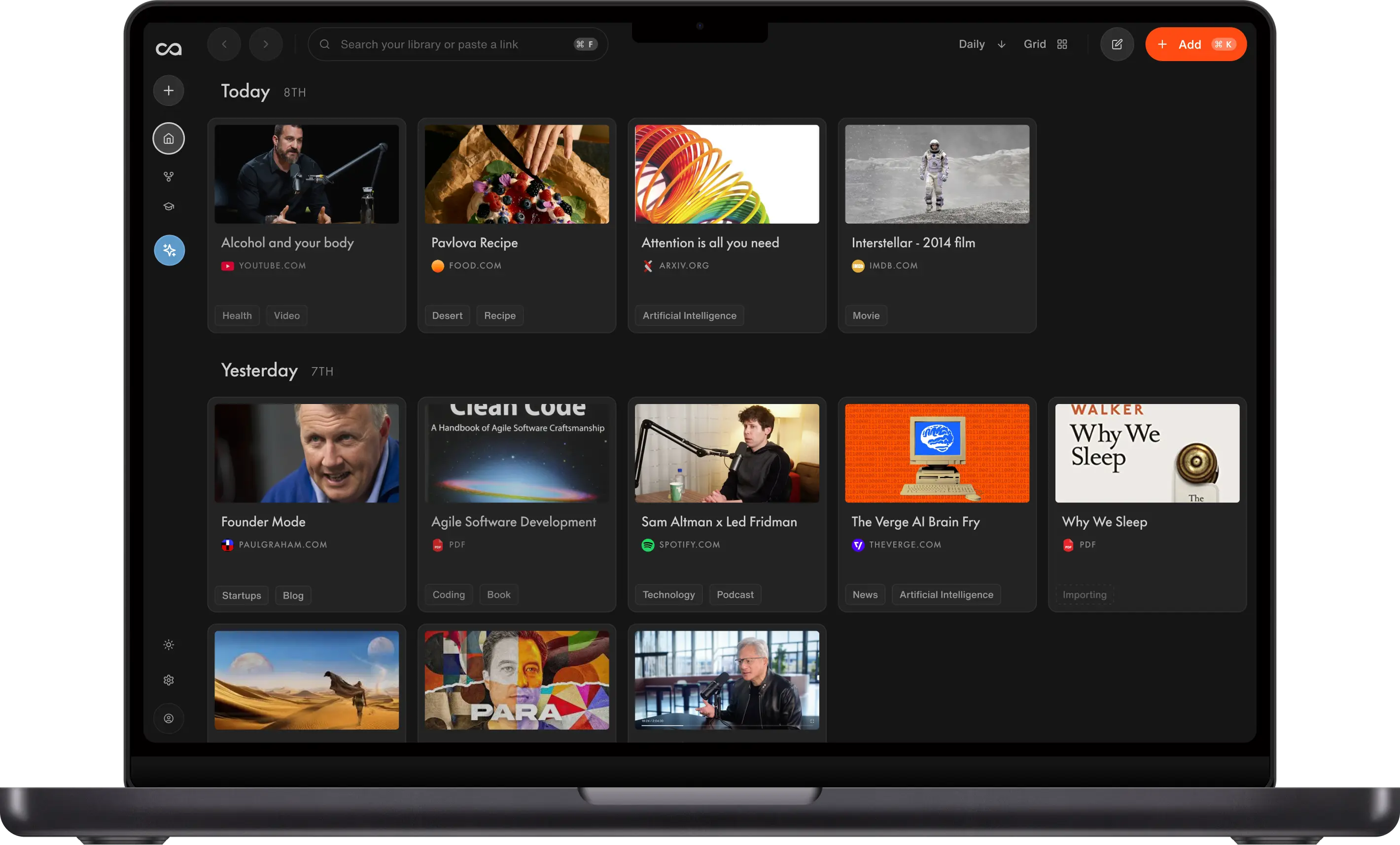
Choose Recall when you want a personal AI knowledge base for saving what you read, watch, and learn, then adding your own thoughts beside each source in a block-style editor. Recall summarizes, organizes, connects, and chats across that mix of saved knowledge and notes. The other seven tools serve different needs: flexible workspaces, handwriting, local files, polished docs, work notes, private objects, and open-source outlining.
What to use when
- Recall if you want a personal AI knowledge base: unlimited saves, one-click capture, a block-style editor for your own notes, AI summaries, automatic organization, and library-wide chat.
- Notion if you need a flexible workspace for docs, databases, wikis, and team collaboration you are willing to structure yourself.
- Microsoft OneNote if handwritten ink, freeform pages, and Microsoft 365 are central to your existing workflow.
- Obsidian if you want local Markdown files, a knowledge graph, and plugins, and are comfortable maintaining your own system.
- Craft if you want beautiful, fast documents on Mac, iPad, and iPhone without a complicated database layer.
- Mem if your notes are mostly meetings, calendar context, and fast work capture with AI helping organize them.
- Anytype if privacy, local-first ownership, and object-based organization matter more than a mature integration ecosystem.
- Logseq if you want a free, open-source outliner with journals, linked blocks, graph views, and flashcards.
- Evernote if you rely on its established notebooks, familiar web clipper, and handwritten OCR habits that already work for you.
Get started with Recall for free
See why Recall is the best Evernote alternative: unlimited saves, AI summaries on capture, and library-wide chat in a modern knowledge base.
Best Evernote alternatives compared (2026): ranked by knowledge type, how knowledge compounds, AI features, and the main tradeoff.
| Alternative | Best for | Knowledge type | How knowledge compounds | AI features | Main tradeoff |
|---|---|---|---|---|---|
| Recall | Personal AI knowledge base | Articles, videos, PDFs, notes | Summaries, graph, and chat across the library | Summaries, chat across sources or the web, and MCP | Not local-first; no handwriting OCR |
| Notion | Flexible docs, databases, and wikis | Pages and databases you design | Templates and Notion AI inside pages you maintain | Notion AI on pages you maintain | You still build and file the system |
| Microsoft OneNote | Handwritten notes and Microsoft 365 | Freeform pages, ink, and Office files | Notebooks, sections, and Copilot in Microsoft 365 | Copilot in Microsoft 365 | Weak as a compounding web knowledge base |
| Obsidian | Local Markdown knowledge base | Local Markdown files | Links, graph, and plugins you add yourself | Plugins or a DIY Claude/MCP setup | You build the capture and AI stack |
| Craft | Polished documents on Apple devices | Documents and collections | Writing and sharing, not a capture library | Little native AI | Weak web knowledge workflow |
| Mem | AI work notes and meetings | Meetings and work notes | Auto-organization and chat on work notes | Auto-organization and chat on work notes | Not a web, video, and PDF library |
| Anytype | Privacy-first object-based workspace | Local objects and sets | Relations and graph you design | Limited native AI | Weaker AI capture and chat |
| Logseq | Open-source local-first outlining | Local outlines and journals | Links, queries, and flashcards | Plugins and queries; no native AI | Outliner-first; weaker web capture |
| Evernote | Legacy capture, notebooks, and OCR | Clips, scans, and notebooks | Notebooks, tags, and search | Search and limited AI | Manual filing and weaker AI chat |
Scroll horizontally on small screens. Verify current plan limits and pricing on each vendor's site.
For a focused comparison of Recall and Evernote, see Recall vs Evernote.
What is Evernote?
Evernote is a long-running note-taking and web-clipping app built around notebooks, tags, search, and attachments. It helped define the "save everything" workflow: clip a webpage, write a note, scan a document, and retrieve it later from a notebook-based archive.
Evernote is built for people who want a familiar general-purpose notebook. Its combination of web clipping, document scanning, handwriting support, and OCR remains valuable for long-time users with established notebooks.
Main features of Evernote
- Web clipper: Save webpages and selected content into notebooks
- Notebooks and tags: File notes with familiar hierarchy and labeling
- Document scanning and OCR: Search text in scanned documents and many handwritten notes
- Rich notes and attachments: Combine text, images, files, checklists, and PDFs
- Cross-device sync: Access notes across desktop, web, and mobile apps
Evernote use cases
Evernote fits when you want a simple, established capture archive:
- Legacy notebooks: Keeping a long-running archive you already know how to navigate
- Handwritten and scanned notes: Capturing paper notes, receipts, and documents with OCR
- Basic web clipping: Saving webpages into a familiar notebook structure
- Personal reference: Storing checklists, travel details, recipes, and documents
Evernote limitations (and why people look for alternatives)
- Manual organization: Notebooks and tags need upkeep as the archive grows
- Limited AI knowledge workflow: AI assistance is not a full replacement for summaries, automatic connections, and chat across everything you save
- Older capture model: Web clipping is useful, but modern knowledge workflows often begin with video, PDFs, podcasts, and conversational retrieval
- Notebook silos: A folder-like archive can make connections between related topics harder to see
- Pricing pressure: Some long-time users look elsewhere when paid plans no longer match the value they receive
8 best Evernote alternatives in detail
1. Recall
Recall is best for: people who want a personal AI knowledge base, where saved articles, videos, and PDFs sit beside your own notes, then get summarized, organized, and ready to chat with.
Recall features:
- Unlimited saves: Keep a growing library without treating each saved source as a quota decision
- One-click capture: Save web pages, videos, podcasts, PDFs, and notes from browser and mobile workflows
- Rich notes: Add your own thoughts and ideas beside every source in a block-style editor (tables, to-dos, code)
- AI summaries on save: Get the useful context from each source without a separate distill step
- Automatic organization: Smart tags and a knowledge graph connect related saves
- Library-wide chat: Ask questions across your archive and get answers grounded in your saved sources
- Spaced repetition: Turn important material into review that supports long-term retention
Recall pricing: a free tier includes unlimited saves. Recall Plus starts from about $10/month and adds full AI summaries, library-wide chat, and more AI features. See Recall pricing for current plans.
Knowledge type: Articles, YouTube, podcasts, PDFs, and notes in one library.
How knowledge compounds: Summaries, automatic tags, a knowledge graph, and library-wide chat make old clips answer new questions. Tradeoff: it is not local-first and does not replace handwritten OCR.
Recall vs Evernote: Recall is better for an AI-powered library that combines web saves with your own notes, then makes that mix searchable and conversational. Evernote remains a sensible choice if handwritten OCR, existing notebooks, or a familiar legacy workflow are the reasons you keep it.
Go deeper: Full Evernote alternative comparison: Recall vs Evernote
2. Notion
Notion is best for: people and teams who want to turn notes into a custom workspace with docs, databases, wikis, templates, and collaboration.
Notion features:
- Block editor: Build pages with text, tables, embeds, toggles, and media
- Databases: Use tables, boards, calendars, galleries, and relations to organize work
- Team workspaces: Share docs, add comments, manage permissions, and maintain wikis
- Templates: Start from a large ecosystem of reusable setups
- Notion AI: Draft, summarize, and assist inside the workspace
Notion pricing: a capable free plan is available; Plus plans typically start around $10 per user per month on annual billing. Check Notion for current pricing.
Knowledge type: Pages, databases, wikis, and docs you design.
How knowledge compounds: Templates, relations, and Notion AI help inside the workspace you maintain. Tradeoff: capture and filing stay mostly manual.
Notion vs Evernote: Notion is stronger for shared wikis, databases, and workspaces you design. Evernote is simpler for an established notebook-and-clipper habit. Neither removes manual structure as thoroughly as Recall for a library of web saves and your own notes.
3. Microsoft OneNote
Microsoft OneNote is best for: people who need handwritten notes, freeform pages, and Microsoft 365 integration more than an AI-first knowledge system.
Microsoft OneNote features:
- Freeform canvas: Place text, drawings, images, and clippings anywhere on a page
- Ink and handwriting: Write, draw, and annotate with touch or stylus input
- Notebook hierarchy: Organize notes into notebooks, sections, and pages
- Microsoft 365 integration: Work alongside Outlook, Teams, Word, and other Microsoft tools
- Audio and attachments: Keep recordings, files, and meeting material beside notes
Microsoft OneNote pricing: OneNote is free with a Microsoft account; storage and some Copilot capabilities depend on your Microsoft 365 plan.
Knowledge type: Freeform pages, ink, audio, and Microsoft 365 files.
How knowledge compounds: Notebooks, sections, and Copilot stay useful inside Microsoft 365. Tradeoff: it is weak as a compounding web knowledge base.
Microsoft OneNote vs Evernote: OneNote is the better Evernote alternative for handwritten notes, classroom pages, and a Microsoft-based workday. Evernote may feel more focused for clipping and notebook search. Recall is better when your goal is to capture external knowledge and retrieve it with AI.
4. Obsidian
Obsidian is best for: people who want local Markdown files they own, plus backlinks, graph views, and a deep plugin ecosystem.
Obsidian features:
- Local Markdown vault: Notes stay as plain files on your device
- Backlinks and graph view: Surface links between notes and topics
- Plugins: Extend the app for tasks, citations, sync, AI, and custom workflows
- Canvas: Map ideas visually beside text notes
- Flexible export: Keep files portable instead of locked inside a hosted service
Obsidian pricing: free for personal use. Optional Sync and Publish services, plus some third-party plugins, can add costs.
Knowledge type: Local Markdown files you own.
How knowledge compounds: Links, graph view, and plugins you add yourself. Tradeoff: you build the capture and AI stack.
Obsidian vs Evernote: Obsidian is the better Evernote alternative for ownership, linking, and extensibility. Evernote is easier for people who want a ready-made clipper and notebook archive. Recall is better for automatic summaries and AI chat without configuring plugins or maintaining a vault.
5. Craft
Craft is best for: people who value beautiful, fast documents on Mac, iPad, and iPhone and want a more polished writing experience than a traditional notebook app.
Craft features:
- Polished block editor: Write clean, readable documents with a responsive native feel
- Collections and links: Connect documents without building a full database
- Publishing and sharing: Send refined pages to clients, colleagues, or friends
- Apple-native apps: Strong workflows across macOS, iPadOS, and iOS
- Daily notes: Capture work and personal notes in a time-based view
Craft pricing: a free tier is available; Plus plans typically start around $8/month on annual billing. Check Craft for current limits.
Knowledge type: Polished documents and collections on Apple devices.
How knowledge compounds: Writing, linking, and sharing. Tradeoff: it is not a capture-and-chat knowledge base.
Craft vs Evernote: Craft is stronger for writing, sharing, and polished document presentation. Evernote is more oriented around capture archives and handwritten OCR. Choose Recall instead when the primary need is automatic capture, summarization, organization, and chat across saved sources.
6. Mem
Mem is best for: people who want AI-native work notes tied to meetings, calendar context, quick capture, and fast retrieval.
Mem features:
- AI search and chat: Find and ask across notes without relying only on folders
- Automatic organization: Let related notes and context surface with less manual filing
- Meeting workflows: Capture work discussions and calendar-related context
- Fast inbox: Record ideas and brain dumps before deciding where they belong
- Writing assistance: Use AI to clean up and develop work notes
Mem pricing: a free tier is available with limits; paid plans commonly begin around $10/month. Verify current plans with Mem.
Knowledge type: Meetings, calendar context, and work notes.
How knowledge compounds: Auto-organization and chat across work notes. Tradeoff: it is not a lasting web, video, and PDF library.
Mem vs Evernote: Mem is lighter and more AI-native for fast work notes than Evernote's notebook model. It is less suited to a carefully owned local vault. Recall is the stronger choice when your long-term library is mostly articles, videos, podcasts, and PDFs from the web.
7. Anytype
Anytype is best for: people who want a privacy-first, local-first workspace with objects, sets, and links instead of conventional notebooks.
Anytype features:
- Local-first objects: Create notes, tasks, bookmarks, and collections you store locally
- Object types and sets: Organize information by type and relation
- Encrypted sync: Keep control of data while syncing across devices
- Graph and relations: Connect knowledge without relying on a notebook tree
- Offline access: Continue working without a constant cloud connection
Anytype pricing: a free tier is available; paid plans typically start around $8/month. Check Anytype for current options.
Knowledge type: Local-first objects, sets, and relations.
How knowledge compounds: Types, sets, and a graph you design. Tradeoff: weaker AI capture and library chat.
Anytype vs Evernote: Anytype is the stronger Evernote alternative for privacy, ownership, and object-based organization. Evernote is more mature for quick traditional clipping and scanned-note OCR. Recall is better for an AI knowledge workflow that begins with external content and needs automatic summaries.
8. Logseq
Logseq is best for: people who want a free, open-source, local-first outliner built around daily journals, linked blocks, graph views, and flashcards.
Logseq features:
- Journal-first capture: Start each day with a simple running outline
- Linked blocks: Reference and reuse individual thoughts across notes
- Local files: Keep data in plain-text formats you control
- Graph and queries: Explore connections and create views from linked notes
- Flashcards and whiteboards: Review material and sketch relationships inside the same tool
Logseq pricing: Logseq is free and open source. Optional services and community tools may have separate costs.
Knowledge type: Local outlines, journals, and linked blocks.
How knowledge compounds: Links, queries, and flashcards. Tradeoff: outliner-first, with weaker automatic web capture.
Logseq vs Evernote: Logseq is the stronger Evernote alternative for open-source ownership, daily outlining, and linked thought. Evernote is easier if you prefer traditional notebooks and do not want an outliner-first interface. Recall offers more automatic web capture, summaries, organization, and library-wide chat.
Bottom line
For most people searching for an Evernote alternative because their notebooks have become a static archive, Recall is the best Evernote alternative in 2026: save from the web, add your own notes in a block-style editor, get AI summaries, and chat across the full library. Pick Notion for flexible team workspaces, Microsoft OneNote for handwriting and Microsoft 365, Obsidian or Logseq for local-first files, Craft for polished documents, Mem for AI work notes, and Anytype for privacy-first organization.
When to keep Evernote
Evernote is still the right tool when:
- You rely on a large, well-organized legacy notebook archive
- Handwritten OCR and document scanning are a daily part of your workflow
- Its web clipper, notebooks, and tags are habits that already work reliably
- You want a conventional notes app rather than a local-first vault or structured workspace
Use an Evernote alternative when you want saved knowledge to do more than sit in notebooks: capture from more sources, summarize automatically, make connections, and answer questions across your full library.
FAQs
Best Evernote alternative by use case
How to choose an Evernote alternative
About Evernote
When to choose each alternative
See more tools on the Recall comparison hub or the full comparison table.
Ready to get started?
Save, summarize and chat with your content.
No credit card required · 30 Day Refund on Premium · 24 Hour Support