AI-POWERED KNOWLEDGE BASE
The Best Notion AlternativeFor Knowledge That Organizes Itself
Notion is powerful when you want to build a workspace from scratch. Recall is the Notion alternative for saving what you read, watch, and learn, then letting AI summarize, organize, connect, and chat across it automatically.
One-click web capture
AI summaries on save
Automatic knowledge graph
Private and exportable
No credit card · 30 Day Refund · 24 Hour Human Support
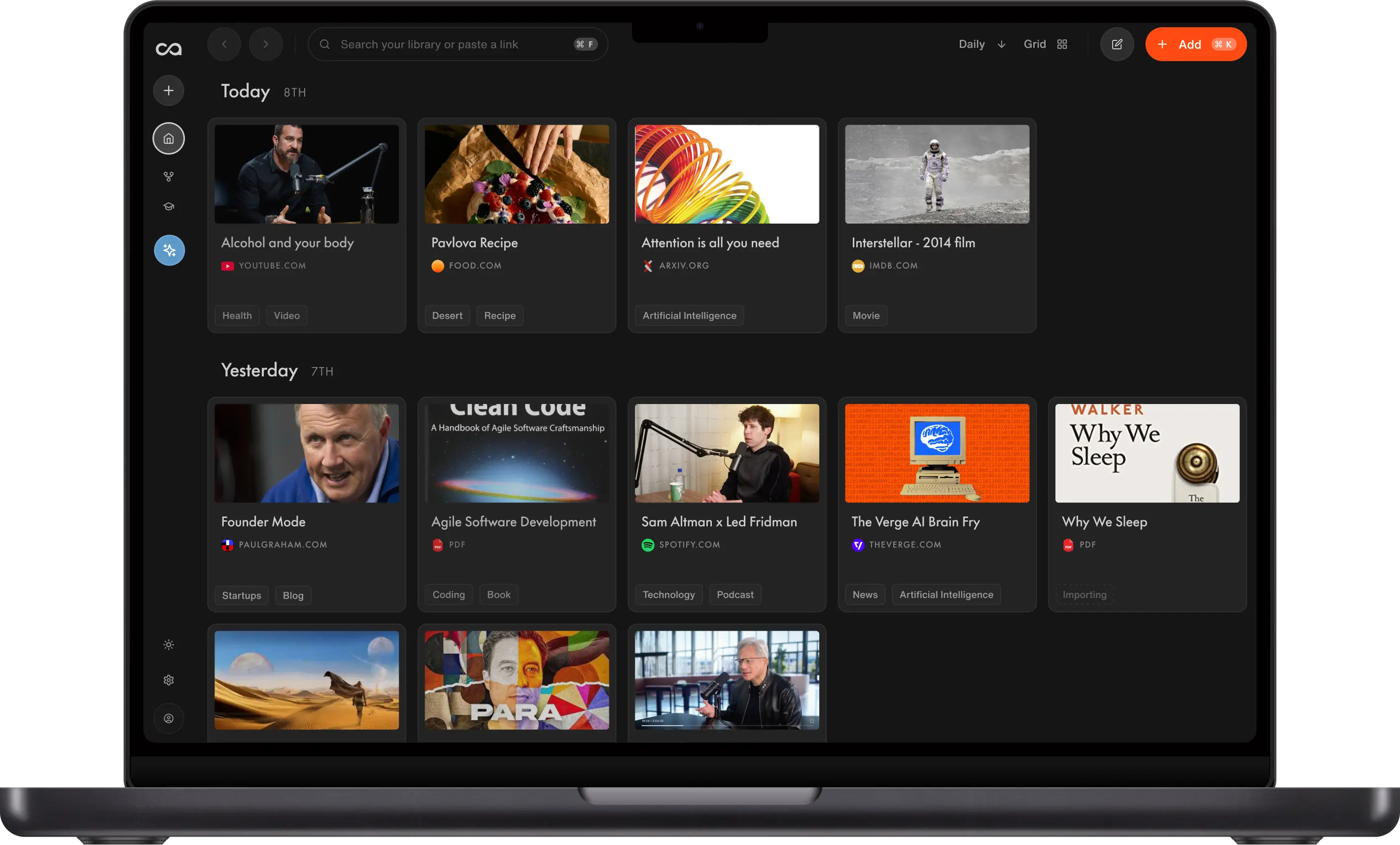
Your AI knowledge base

Alcohol and your sleep

The PARA Method

State of GPT · Andrej Karpathy

Interstellar (2014)
Founder Mode


Attention is all you need


Bryan Johnson's Blueprint protocol
Trusted by 700,000+ professionals







Why people make Recall part of their day
“Think of it as a library of everything you've read and watched, with an AI sitting on top that has read it too. Recall makes that easier than anything else we tried.”

“Recall works the way your brain works! Perfect for deep research or growing your knowledge on any topic.”

“I love [Recall’s] interface, its speed, and its overall user experience… it is scratching my web-hoarding itch unlike anything else has quite been able to do to date.”

“One of my favorite AI apps is Recall. I've used it constantly for almost a year to manage and transcribe all the videos we create and work with. It's the kind of AI app that's just become part of my daily workflow, the highest compliment you can pay a piece of software.”

“After just a few months, Recall has become one of my most-used apps on both desktop and mobile. Frankly, I'd rather give up Microsoft Word than Recall.”

“I've tried practically every AI tool out there, and Recall is among the very few that I've actually found myself using. It has completely changed the way I study.”

“I didn't expect much from Recall. But it completely blew me away. It does everything NotebookLM does and also fills in all its shortcomings.”

“I run two parallel careers, which means staying current across rapidly evolving topics. Recall is the front door to my entire knowledge workflow.”

Fernand
Head of Technology
“Recall has revolutionized how I manage information! As a power user, its AI-driven summarization and storage capabilities have boosted my productivity tenfold, allowing me to effortlessly access and recall key details whenever I need them.”

William Peltier
Senior Director at Moody's
“I use Recall on a daily basis to cultivate and build a hand-picked database of information. The end result is like having a personalized AI loaded with sources pre-screened for quality.”

Roses
Human Rights Worker
“I use Recall every day. It helps me quickly condense important information from thought leadership articles and educational YouTube videos. It's great to have a place where I can easily store this information knowing that I will come back to it again in the future. I've greatly developed as a founder and leader thanks to Recall.”

Jason Patel
Co-founder at Open Forge AI
“I've been building several second brains for years and whenever I see a new way to do it, I don't like changing because my other systems already work. But I'm always willing to try because you never know which one would be a drastic improvement on what you're already using. Recall is one of them.”

Dave Katague
AI Educator
“Recall has become an essential part of how I learn, think, and explore the world.”

Maire
Student, Data Analyst
WHY PEOPLE SWITCH
Why People Switch to Recall
People looking for a Notion alternative often want the value of a second brain without building dashboards, databases, and templates first. Recall gives you capture, summaries, organization, and chat out of the box.
Capture Without Setup
Save articles, YouTube videos, podcasts, PDFs, and notes in one click from Chrome, Firefox, or mobile, without building a database first.
Summaries on Save
Every source gets an instant AI summary, so your knowledge base is useful the moment you capture something.
Automatic Organization
Recall adds smart tags and connects related ideas automatically, so you do not maintain properties, views, and relations by hand.
Chat Across Everything
Ask questions across your entire library, a single source, or the web. Answers cite the saved sources they used.
Built for Learning
Use quizzes and spaced repetition to remember what you save, not just store it in another workspace.
Library Stays Yours
Recall never trains AI on your content, and you can export your library anytime.
NOTION ALTERNATIVE FOR
Research, Learning, and Personal Knowledge
Recall is not trying to replace every team wiki or project tracker in Notion. It is built for the knowledge workflows where Notion often becomes too manual.
Research
- Save articles, papers, PDFs, and videos in one place
- Get summaries and citations as soon as you save
- Chat across sources when outlining or writing
Learning
- Turn saved material into quizzes
- Review with spaced repetition
- Reconnect old ideas through the knowledge graph
Personal Knowledge
- Capture ideas from browser and mobile
- Take notes beside every saved source
- Find answers without maintaining a dashboard
HOW IT WORKS
Save, Organize, Chat, Remember
Four steps from scattered research to a connected AI knowledge base.




01
Save
Save articles, YouTube videos, podcasts, PDFs, and notes in one click from your browser or phone.
Business
Design
Technology
Education
Culture
02
Organize
Recall creates instant AI summaries, automatic tags, and a knowledge graph so related ideas connect without manual databases or properties.
03
Chat
Ask questions across your whole library and write notes beside the sources you saved.
MULTIPLE CHOICE
How does REM sleep affect your body?
04
Remember
Use quizzes, spaced repetition, and resurfaced connections to review what matters over time.
NOTION ALTERNATIVE COMPARED
Recall vs. Notion
How Recall compares with Notion for personal knowledge management, research, and AI-assisted learning.
| Feature | Recall | Notion |
|---|---|---|
| Use case | ||
Best for | AI knowledge base for research, learning, and saved sources | Flexible workspace for docs, databases, wikis, and projects |
| Setup | ||
Time to useful | Useful immediately after saving your first source | Often requires templates, databases, and manual structure |
| Capture | ||
Save from the web | One-click save and summarize with the web clipper | Web clipper and manual database entry |
YouTube, podcasts, and PDFs | Full content saved with summaries and transcripts | Embeds, files, and links, with more manual context |
| AI | ||
AI summaries on save | Instant summary on every article, video, podcast, and PDF you save | Notion AI can summarize a page you already wrote; capture is not AI-first |
What you can chat with | Your whole library, selected saves, the open web, or both — with citations back to the source | AI over workspace pages, depending on plan and how you structured the wiki |
AI model choice | Yes on Max — OpenAI, Anthropic, Google, and open-source. Plus picks the best model for the task. | Notion AI models; no mix of your library plus the open web in one chat |
| Organization | ||
How saves get organized | Automatic tags and a knowledge graph that connect related saves as you add them | Manual databases, properties, relations, and views you design yourself |
| Notes | ||
Rich text notes | Block-style notes beside saved sources | Excellent block editor for docs and pages |
| Retention | ||
Quizzes and spaced repetition | Turn any save into quizzes and spaced repetition so useful ideas stick | Requires templates, integrations, or a separate study tool |
| Collaboration | ||
Team workspaces | Focused on personal knowledge workflows | Strong team collaboration, docs, and project management |
| Ownership | ||
Privacy and export | Never trains on your content; export anytime | Workspace export available; AI privacy depends on plan and settings |
Scroll horizontally to compare all columns.
Quick comparison: choose Notion when you need a flexible workspace, team wiki, databases, and project management. Choose Recall as your Notion alternative when you want fast capture, automatic summaries, AI organization, and chat across everything you save.
Build a Knowledge Base Without the Template Work
Join 700,000+ people using Recall as a Notion alternative for capture, summaries, connections, and AI chat.
GET STARTED FOR FREE TODAYNo credit card required · 30 Day Refund on Premium · 24 Hour Support
SECURITY POLICY
You're safewith us
We do not use your data for any other purpose than providing a service to you.

Data ownership
Your data is yours and you have full control over it. We do not use your data for any other purpose than providing a service to you.

Data portability
You can export all your data anytime in Markdown format, putting the power of portability and accessibility directly in your hands.

Privacy focused
Augmented browsing is local first, your knowledge base is stored safely in the cloud.


Frequently Asked Questions About Notion Alternatives
Looking for more? Visit our full FAQ for more detail.
Ready to Try a Simpler Notion Alternative?
Save, summarize and chat with your content.
No credit card required · 30 Day Refund on Premium · 24 Hour Support