
Tensions in Knowledge Management
- Human knowledge management involves a constant tension between the desire for knowledge, which seeks to make sense of the world, and the desire for action, which focuses on achieving goals. 0s
- Excessive focus on knowledge can lead to fragile thoughts that are never tested against reality, while excessive focus on action can cause individuals to lose sight of what matters, leading to fragile hearts and souls. 15s
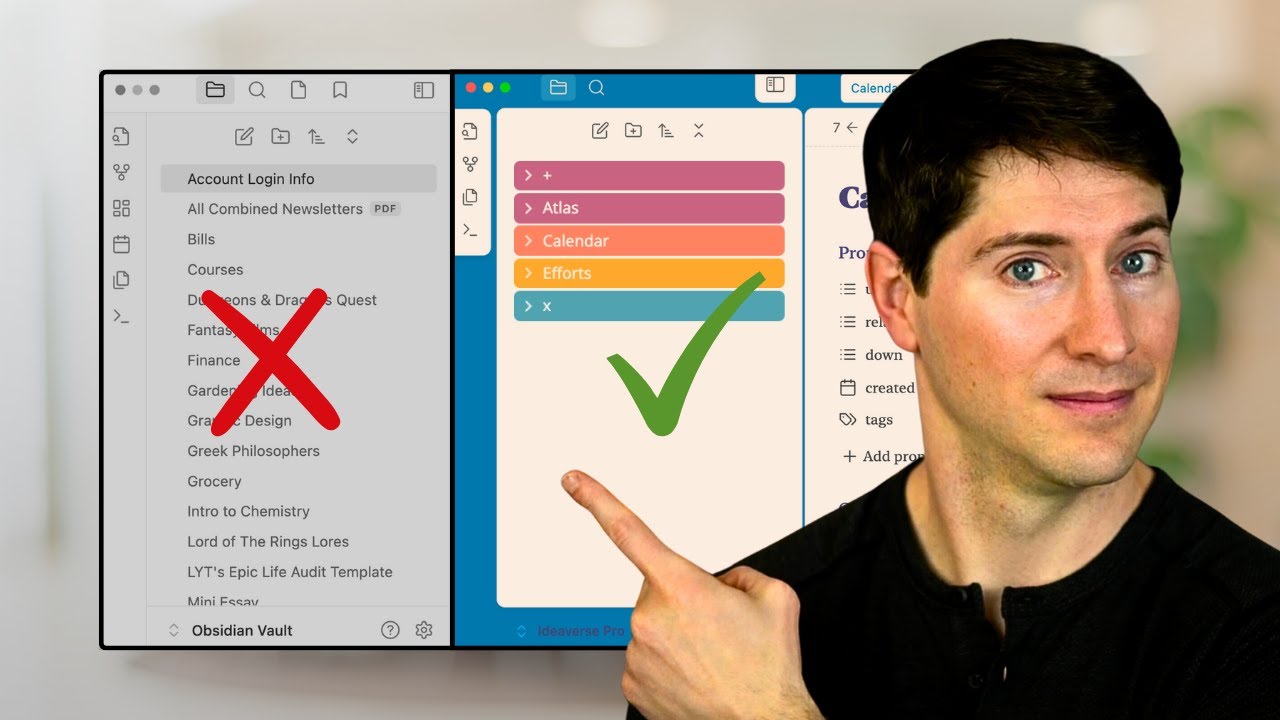
- The exponential increase in daily information consumption has created a new conflict between the use of folders and the use of links. 35s
Conceptual Frameworks for Knowledge and Action
- The A.C.C.E.S.S. folder structure is proposed as a solution to balance the order of folders with the creative chaos of links, aiming to integrate both approaches into a holistic system for managing knowledge and action. 50s
- A conceptual map for knowledge management systems uses two axes: a vertical axis representing the tension between knowledge (top) and action (bottom), and a horizontal axis representing the tension between folders (left) and links (right). 1m15s
Analysis of Existing Management Systems
- Microsoft Word is categorized as a folder-based system primarily focused on knowledge management rather than action or linking. 1m45s
- Wikipedia, emerging at the start of the 21st century, is identified as a public knowledge management system that relies on links rather than folders. 2m5s
- Getting Things Done (GTD), developed by David Allen, is positioned as a system focused primarily on action, with a structure that leans toward folders, though some users attempt to incorporate links or tags. 2m25s
- Zettelkasten is characterized as a system that emphasizes the use of links as its primary mechanism for knowledge management. 2m50s
- Zettelkasten functions as a hybrid system that bridges knowledge and action, leaning toward knowledge management while becoming more action-oriented during the output phase 0s.
- Johnny.Decimal is a folder-oriented system primarily focused on knowledge management, though it retains some capacity for action-based tasks 18s.
- The PARA system serves as a spiritual successor to Getting Things Done (GTD), designed to manage both knowledge and action through a folder-based structure, though it can be adapted for other uses 32s.
- PPV (P.A.R.A. + P.V.A.) is a system designed for Notion that utilizes databases, which function more like links than folders, and it spans both action and knowledge domains 45s.
The ACCESS Folder Structure
- The A.C.C.E.S.S. folder structure is a hybrid system designed to unify folders and links to balance the tensions between knowledge and action 1m3s.
- Understanding the mechanics of various knowledge management systems allows individuals to select the tools that best suit their specific goals 1m25s.
Components of the ACCESS Framework
- The Atlas folder contains higher-order notes, such as maps of content, dashboards, and overviews, which provide a bird's-eye view to help navigate and develop ideas 1m45s.
- The Calendar folder is used to log, track, and review time-based information, including daily notes, meetings, plans, and journals 2m15s.
- The Cards folder serves as a container for individual notes, ideas, and insights, allowing for flexible organization through subfolders such as people, concepts, recipes, or exercises 2m35s.
- The A.C.C.E.S.S. framework is an acronym representing Atlas, Calendar, Cards, Extras, Sources, and Spaces, designed to manage knowledge and action 2m6s.
- The framework addresses three primary tensions in knowledge management: the balance between knowledge and action, the integration of folders and links, and the need for effective structure 2m6s.
- Extras serve as a repository for support materials, including attachments, graphics, images, manuals, templates, and hand drawings 0s.
- Sources function as an external library for organizing encountered information, such as articles, books, podcasts, research papers, courses, talks, movies, TV shows, and videos 15s.
- Spaces represent the major domains of an individual's life, with a recommendation to maintain two or three spaces, such as life, work, and hobbies or side hustles 42s.
Implementing MAPS within Spaces
- Within each space, users deploy M.A.P.S., which stands for MOCs (Maps of Content), Areas, Projects, and Support Notes 1m5s.
- The A.C.C.E.S.S. folder structure is designed to mimic the flow from knowledge to action, with knowledge represented by higher-order maps and dashboards at the top, and action occurring within the spaces at the bottom 1m35s.
- The Light Kit is a free, downloadable starter kit for managing digital notes that has been downloaded over 33,000 times 1m50s.
Integrating Folders and Links
- The A.C.C.E.S.S. folder structure is designed to integrate the benefits of both folder-based organization and link-based systems, allowing for a balance between structured knowledge management and the creative potential of bottom-up, chaotic information gathering 0s.
- The framework operates on a feedback loop between encountering new information and expressing ideas, with a thinking process occurring in between 35s.
Detailed ACCESS Folder Definitions
- The "Encounters" folder serves as the initial location for storing new ideas 45s.
- The "Atlas" folder functions as a top-down view, housing maps of content and data scopes that pull information from various sources using saved searches or queries 52s.
- The "Calendar" folder provides temporal context, allowing users to tether knowledge to specific times and dates, which aids in memory and understanding 1m25s.
- The "Cards" folder acts as a catch-all for atomic notes, concept cards, or people cards, offering flexibility in whether a user chooses to implement sub-folders or rely on links 1m45s.
- The "Extras" folder is designated for miscellaneous items such as media, templates, PDFs, and other documents 2m15s.
- The "Sources" folder is used to store information from the outside world, such as books and external references 2m20s.
System Design and Future Lessons
- The A.C.C.E.S.S. system is defined as a personal computer-aided management (PCAM) framework that uses folders for structure while utilizing link-based maps of content to dynamically connect notes across different directories 2m35s.
- Future lessons will focus on managing projects within a link-based system, specifically utilizing the "Spaces" folder and the deployment of maps 3m5s.
Managing Spaces and MAPS
- Personal Knowledge Management (PKM) systems can effectively manage both action and knowledge by utilizing a structure called "spaces." 0s
- Spaces are defined as broad areas of life, such as work, life, entertainment, or specific hobbies, and they offer flexibility in how one organizes their personal and professional responsibilities. 7s
- Within each space, users deploy a framework known as M.A.P.S., which stands for Maps of Content (MOCs), Areas, Projects, and Support notes. 35s
- The M.A.P.S. framework serves as a hybrid system that combines traditional folder-based organization with link-based knowledge management. 53s
- Maps of Content (MOCs) act as navigational tools that allow users to jump into specific topics, such as finances or health, within a given space. 1m3s
- Areas are used for ongoing planning, review, and the management of specific notes related to broader categories like financial or health-related tasks. 1m12s
- Projects represent specific, actionable tasks that can be planned and prioritized within the context of a user's life or work space. 45s
- For business management, spaces can be organized around key areas such as content creation, community efforts, team management, technical administration, and financials. 1m35s
- Notes and folders can be nested within specific areas of a workspace, allowing for a modular structure where folders can be moved or reorganized while maintaining their relationship to the broader space. 1m55s
Flexibility in Personal Knowledge Management
- The A.C.C.E.S.S. system utilizes Maps, M.O.C.s (Maps of Content), Areas, Projects, and Support notes to create a hybrid organizational structure that combines folders and links 0s.
- The system is designed to be flexible, allowing users to break and reshape the structure to fit their personal needs, reflecting the fundamental principle that personal knowledge management (PKM) is inherently personal 1m15s.
Balancing Order and Chaos
- Human experience is defined by a constant tension between order and chaos, a duality historically represented by Apollo and Dionysus and reflected in the balance between structured grids and untamed nature 15s.
- This tension between order and chaos extends to the management of ideas, where individuals struggle to balance the acquisition of knowledge with the necessity of taking action 45s.
- The digital age has introduced a new layer of tension between the use of folders and the use of links for organizing information 58s.
- A free light kit is available for download to be used as a new vault in Obsidian, serving as a space for users to experiment and learn through practical application 1m35s.
- Managing information that resonates with an individual can transform the experience from a chaotic burden into an engaging and interesting pursuit 1m28s.