8 Best Obsidian Alternatives in 2026, Ranked by Use Case
Obsidian is powerful if you will maintain a vault; most people want capture and chat without plugins. We ranked eight alternatives by how knowledge compounds after the save: Recall for a personal AI knowledge base with automatic organization and chat, without a vault to maintain, Logseq for local outlines, Capacities for typed objects, and RemNote for study.
Last updated: August 2026
What are the best Obsidian alternatives?
The best Obsidian alternatives in 2026 are Recall for a personal AI knowledge base with automatic organization and chat, without a vault to maintain, Logseq for local-first outlining, Capacities for object-based PKM, Anytype for private offline objects, Reflect for AI-assisted notes, RemNote for learning and spaced repetition, Heptabase for visual research, and Notion for collaborative docs and databases.
Obsidian is powerful, but it asks you to design and maintain a Markdown vault. That is ideal for people who value local files, offline control, and a plugin-driven workflow. It is less ideal when saving articles, videos, podcasts, and PDFs should be automatic, or when you want AI to summarize and connect a growing library without configuring plugins.
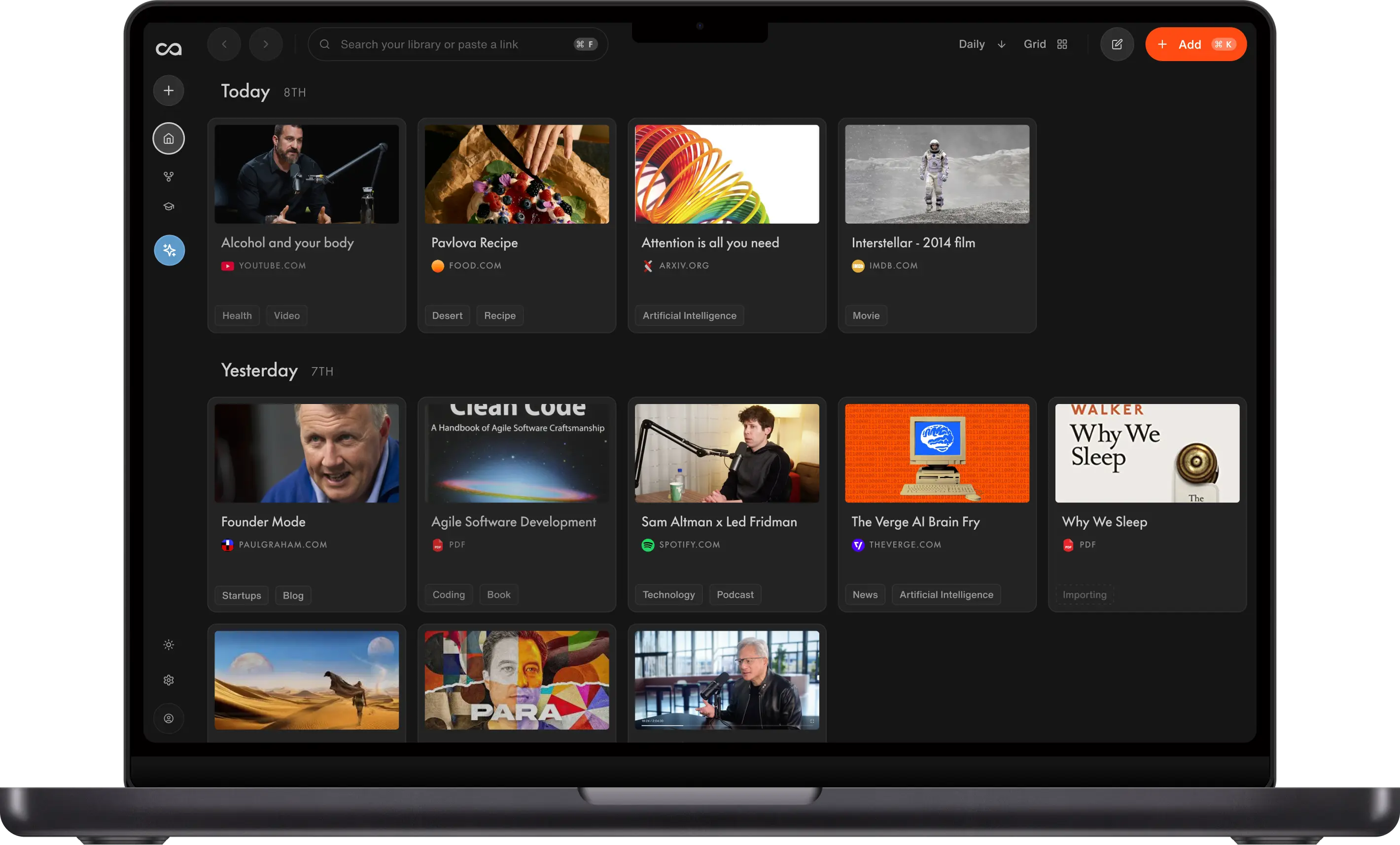
Choose Recall if you want one library that combines what you save from the web with your own notes. Recall captures articles, videos, and PDFs in one click, lets you write beside every source, then summarizes, connects, and chats across the full library. The other tools are better fits for local outlines, typed objects, privacy-first work, study systems, visual thinking, or shared team workspaces.
Using Obsidian as an LLM wiki
A growing number of people use Obsidian as the knowledge base for an LLM wiki: a personal corpus that an assistant can read, compile, and answer from. The pattern follows Andrej Karpathy's workflow. You ingest sources, let a model summarize and cross-link them, then ask questions against that library instead of starting from a blank prompt.
That setup is powerful, but it is also a stack you maintain: a vault, capture plugins, and a compile layer such as Claude.
Recall can run the same workflow without the vault work. The free plan includes unlimited notes, so you can keep a growing knowledge base and connect it to Claude, ChatGPT, Cursor, or other assistants through Recall MCP. The model reads from the sources and notes you already saved.
If you want the LLM wiki idea without assembling scripts or plugins, start with How to set up Karpathy's LLM wiki with no code.
What to use when
- Recall if you want web saves and personal notes in one AI knowledge base, with summaries, automatic organization, and chat across the library, without maintaining an Obsidian vault or plugins.
- Logseq if you want local-first daily notes and outlining with a block-based workflow close to Obsidian's linked thinking.
- Capacities if you organize knowledge as people, books, meetings, and ideas, not folders and files.
- Anytype if offline access, privacy, and local ownership matter more than mature integrations.
- Reflect if you want AI-assisted notes, backlinks, and calendar context in a polished, focused app.
- RemNote if your notes exist to support study, flashcards, and spaced repetition.
- Heptabase if you need visual whiteboards to synthesize research, papers, and complex ideas.
- Notion if you need a team wiki, shared docs, or databases more than a local personal vault.
Get started with Recall for free
See why Recall is the best Obsidian alternative: one-click web capture, AI summaries, and an automatic knowledge graph, without maintaining a vault.
Best Obsidian alternatives compared (2026): ranked by knowledge type, how knowledge compounds, AI features, and the main tradeoff.
| Alternative | Best for | Knowledge type | How knowledge compounds | AI features | Main tradeoff |
|---|---|---|---|---|---|
| Recall | Personal AI knowledge base | Articles, videos, PDFs, notes | Summaries, graph, and chat across the library | Summaries, chat across sources or the web, and MCP | Not local-first; not a Markdown vault |
| Logseq | Local-first outlines and journals | Local outlines and journals | Links, queries, and flashcards | Plugins and queries; no native AI | Outliner-first; weaker web capture |
| Capacities | Object-based personal knowledge | Typed objects, notes, and sources | Objects, backlinks, and a graph you design | AI assistance on objects you maintain | You still structure the system |
| Anytype | Private offline objects | Local objects and sets | Relations and graph you design | Limited native AI | Weaker AI capture and chat |
| Reflect | AI-assisted daily notes | Linked notes and calendar context | AI chat on notes you write | Built-in AI chat on notes | Not a web, video, and PDF library |
| RemNote | Learning and flashcards | Study notes and flashcards | Cards and spaced repetition | AI study help and flashcards | Study-first; weaker web capture |
| Heptabase | Visual research and synthesis | Cards, PDFs, and whiteboards | Spatial boards you arrange | Limited AI on research boards | Visual synthesis, not automatic capture |
| Notion | Collaborative docs and databases | Pages and databases you design | Templates and Notion AI inside pages you maintain | Notion AI on pages you maintain | You still build and file the system |
| Obsidian | Local Markdown vaults and plugins | Local Markdown files | Links, graph, and plugins you add yourself | Plugins or a DIY Claude/MCP setup | You maintain the vault and plugin stack |
Scroll horizontally on small screens. Verify current plan limits and pricing on each vendor's site.
For a detailed product comparison, see Recall vs Obsidian.
What is Obsidian?
Obsidian is a note-taking and personal knowledge management app built around local Markdown files. It connects notes through links, backlinks, tags, and a graph view. Its vault model gives people direct ownership of their files and a large plugin ecosystem lets them tailor nearly every part of the experience.
Main features of Obsidian
- Local Markdown vaults: Notes live as plain files you can keep, move, and open outside the app.
- Backlinks and graph view: Linked notes reveal relationships between ideas and sources.
- Plugin ecosystem: Community plugins add syncing, task management, publishing, AI features, flashcards, and more.
- Canvas and daily notes: Visual boards and journal-style workflows support exploration and reflection.
- Offline-first use: Core note taking works without relying on a cloud service.
Obsidian use cases
Obsidian fits people who want a system they can own and customize:
- Personal writing and research: Build a durable archive of notes in Markdown.
- Local knowledge bases: Keep sensitive or long-lived information in files you control.
- Plugin-driven workflows: Combine tasks, queries, calendars, flashcards, and publishing tools.
- Offline work: Write and navigate a vault without a permanent internet connection.
Obsidian limitations (and why people look for alternatives)
- Maintenance overhead: Folders, tags, templates, plugins, sync, and conflicts require decisions and upkeep.
- Capture is fragmented: Web clips and multimedia imports often depend on extensions or third-party workflows.
- AI needs assembly: Summaries and cross-vault chat usually require plugins, local models, or external services.
- Mobile and collaboration trade-offs: Sharing and real-time teamwork are not as straightforward as cloud-native workspaces.
- Blank-vault friction: A powerful empty canvas can slow people who want to learn from saved material immediately.
8 best Obsidian alternatives in detail
1. Recall
Recall is best for: people who want a personal AI knowledge base that captures, summarizes, organizes, and connects web saves and their own notes automatically.
Recall features:
- One-click capture: Save articles, YouTube videos, podcasts, PDFs, and notes from browser and mobile workflows.
- AI summaries on save: Turn long sources into useful summaries without a manual note-distillation step.
- Automatic knowledge graph: Related content is connected without maintaining links, tags, or a folder taxonomy.
- Library-wide chat: Ask questions across everything you have saved, with source citations.
- Notes and review: Add rich notes beside sources and use spaced repetition to retain what matters.
Recall pricing: a free tier supports unlimited saves; Plus starts at about $10/month for expanded AI features and library-wide chat. Verify current limits on Recall's pricing page.
Knowledge type: Articles, YouTube, podcasts, PDFs, and notes in one library.
How knowledge compounds: Summaries, automatic tags, a knowledge graph, and library-wide chat make old saves answer new questions. Tradeoff: it is not local-first and is not a Markdown vault.
Recall vs Obsidian: Recall is stronger when your knowledge arrives from the web and you want AI assistance without vault and plugin maintenance. Obsidian is stronger when local Markdown ownership, offline work, and deeply customized DIY workflows are the goal.
Go deeper: Full Obsidian alternative comparison: Recall vs Obsidian
2. Logseq
Logseq is best for: people who prefer block-based outlining and daily journals while keeping their knowledge local-first.
Logseq features:
- Outliner-first notes: Each thought is a block that can be referenced and rearranged.
- Daily journal: Start with today's page and let links emerge from regular writing.
- Local files: Work with plain-text formats and keep control over your data.
- Backlinks and queries: Surface references and structured information from connected blocks.
- Flashcards: Turn blocks into review prompts for lightweight learning workflows.
Logseq pricing: the core app has historically been free and open source, with optional sync or service plans available. Verify current products and pricing on Logseq's site.
Knowledge type: Local outlines, journals, and linked blocks.
How knowledge compounds: Links, queries, and flashcards. Tradeoff: outliner-first, with weaker automatic web capture.
Logseq vs Obsidian: Logseq is more opinionated around outliners and daily notes, while Obsidian is more flexible as a file-and-plugin workspace. Neither removes the need to manage a local knowledge system. Choose Recall if automatic capture and AI synthesis matter more than local outlines.
3. Capacities
Capacities is best for: personal knowledge management built around typed objects rather than folders and Markdown files.
Capacities features:
- Object types: Create first-class entries for people, books, meetings, pages, and custom types.
- Connected knowledge: Link objects and explore them through graph and relationship views.
- Daily notes and calendar: Tie ideas to time without relying only on a folder hierarchy.
- Web and media capture: Bring external content into an object-based workspace.
- AI assistance: Paid plans add AI tools for working with content.
Capacities pricing: a free tier covers core personal knowledge features; Pro is about $12/month on annual billing. Verify current pricing and included AI usage with Capacities.
Knowledge type: Typed objects, notes, and sources.
How knowledge compounds: Objects, backlinks, and a graph you design. Tradeoff: you still structure the system.
Capacities vs Obsidian: Capacities gives more built-in structure for recurring entities such as people and books. Obsidian offers more file ownership and plugin flexibility. Recall is a better fit when the priority is automatically capturing and understanding a large external-content library.
4. Anytype
Anytype is best for: people who want a privacy-first, local-first workspace with notes, tasks, and objects instead of a cloud-dependent app.
Anytype features:
- Local-first objects: Store notes, tasks, bookmarks, and custom object types under your control.
- Offline access: Continue working when a cloud connection is unavailable.
- Sets and collections: Browse objects through types, filters, and relations.
- Encrypted sync: Synchronize across devices while prioritizing privacy and ownership.
- Graph relationships: Connect objects without treating every item as a file in a folder.
Anytype pricing: a free tier is available, with paid plans and storage options from about $8/month. Confirm current plan details with Anytype before purchasing.
Knowledge type: Local-first objects, sets, and relations.
How knowledge compounds: Types, sets, and a graph you design. Tradeoff: weaker AI capture and library chat.
Anytype vs Obsidian: Both prioritize ownership and offline use. Anytype is more object-oriented and polished for structured work; Obsidian is more Markdown-native and has a broader plugin ecosystem. Recall is better for cloud-based capture and AI knowledge synthesis.
5. Reflect
Reflect is best for: people who want a focused, polished note app with AI, backlinks, and calendar-aware daily notes.
Reflect features:
- Linked notes: Backlinks and graph relationships keep ideas discoverable.
- AI chat and writing tools: Search, summarize, and work with your notes using built-in AI.
- Calendar integration: Connect meetings and daily notes to the way your week unfolds.
- Fast capture: Save thoughts and meeting notes without configuring a plugin stack.
- Privacy controls: The service emphasizes encrypted storage and user-controlled data.
Reflect pricing: Reflect typically starts around $10/month with a trial period; check its site for current annual and monthly pricing.
Knowledge type: Linked notes, daily notes, and calendar context.
How knowledge compounds: AI chat and backlinks on notes you write. Tradeoff: it is not a web, video, and PDF library.
Reflect vs Obsidian: Reflect trades Obsidian's extensibility and local-vault model for a more guided cloud app with integrated AI. Recall goes further for web, video, podcast, and PDF capture across a broad knowledge library.
6. RemNote
RemNote is best for: students and lifelong learners who want notes to become flashcards and scheduled reviews.
RemNote features:
- Integrated flashcards: Turn concepts in notes into prompts without exporting to a separate tool.
- Spaced repetition: Schedule reviews based on recall performance.
- Outliner and backlinks: Build connected study notes with hierarchical structure.
- PDF annotation: Read and annotate source material alongside notes.
- AI tools: Paid plans offer AI-assisted workflows for learning content.
RemNote pricing: a free plan is available; Pro plans start at about $8/month on annual billing. Verify current plans and AI allowances with RemNote.
Knowledge type: Study notes, PDFs, and flashcards.
How knowledge compounds: Cards and spaced repetition from notes you create. Tradeoff: study-first, with weaker automatic web capture.
RemNote vs Obsidian: RemNote has a clearer learning loop and native spaced repetition. Obsidian offers broader customization and local vault control. Recall fits learners who first need to capture and synthesize diverse web content, then review it over time.
7. Heptabase
Heptabase is best for: researchers and visual thinkers who synthesize complex material on whiteboards of connected cards.
Heptabase features:
- Visual whiteboards: Arrange notes, sources, and ideas spatially to see arguments and relationships.
- Card-based notes: Break research into movable, linkable units.
- PDF workflows: Highlight and transform papers into connected research notes.
- Knowledge graph: Follow links among cards and concepts.
- Collaboration: Share boards and work through research with others.
Heptabase pricing: paid plans typically start around $12/month, with pricing and student offers subject to change. Check Heptabase's site for current details.
Knowledge type: Cards, PDFs, and visual whiteboards.
How knowledge compounds: Spatial boards and links you arrange. Tradeoff: visual synthesis, not automatic web capture.
Heptabase vs Obsidian: Heptabase makes spatial synthesis more central than Obsidian's Canvas and graph view. Obsidian remains more flexible for a long-term local vault. Recall is better for automatically ingesting and summarizing everyday web sources before deeper visual analysis.
8. Notion
Notion is best for: teams that need shared documents, wikis, databases, and lightweight project management in one workspace.
Notion features:
- Block editor: Write documents with flexible blocks, embeds, and reusable templates.
- Databases: Build tables, boards, calendars, and galleries with properties and relations.
- Team collaboration: Share pages, comment, assign work, and manage permissions.
- Notion AI: Draft, summarize, and edit content within your workspace.
- Integrations: Connect common work tools and publish selected content.
Notion pricing: a free personal plan is available; Plus plans start at about $10 per member per month. Verify current pricing, AI usage, and seat rules on Notion's site.
Knowledge type: Pages, databases, wikis, and docs you design.
How knowledge compounds: Templates, relations, and Notion AI help inside the workspace you maintain. Tradeoff: capture and filing stay mostly manual.
Notion vs Obsidian: Notion is stronger for collaborative team documentation and database-driven operations. Obsidian is stronger for local Markdown ownership and personal plugin workflows. Recall is the more direct choice for automatic web capture, AI summaries, and a personal knowledge graph without either system's setup burden.
Bottom line
For most people seeking an Obsidian alternative because plugin setup, vault maintenance, and manual web capture interrupt learning, Recall is the best choice in 2026. It turns what you read, watch, and listen to into an AI-organized knowledge library, then lets you chat with it and review what matters.
Choose Logseq for local outlining, Capacities for object-based PKM, Anytype for private offline objects, Reflect for guided AI notes, RemNote for study, Heptabase for visual research, and Notion for collaborative workspaces.
When to keep Obsidian
Obsidian is still the right tool when:
- You want local Markdown files that remain usable without a particular vendor.
- You enjoy building a custom workflow from plugins, templates, queries, and community tools.
- You need offline-first vault control and can manage sync, backups, and conflicts.
- Your system depends on a mature plugin ecosystem or specialized local integrations.
- You prefer to create and maintain links yourself rather than rely on automatic AI organization.
Use an Obsidian alternative when the knowledge work should begin with effortless capture and end with usable answers, rather than maintaining the system in between.
FAQs
Best Obsidian alternative by use case
How to choose an Obsidian alternative
About Obsidian
When to choose each alternative
See more tools on the Recall comparison hub or the full comparison table.
Ready to get started?
Save, summarize and chat with your content.
No credit card required · 30 Day Refund on Premium · 24 Hour Support